
Purchasing & integration of supplier catalogs
Supplier data must be used for sales, purchasing and tracking purposes. Dtouch builds imports and connections to make references and prices usable in your tools.
Concrete functions.
Tools in situ.
Interfaces used to organize work, prepare data and track files. Each screen shows a specific function, with presentation data.
 Enlarge screen
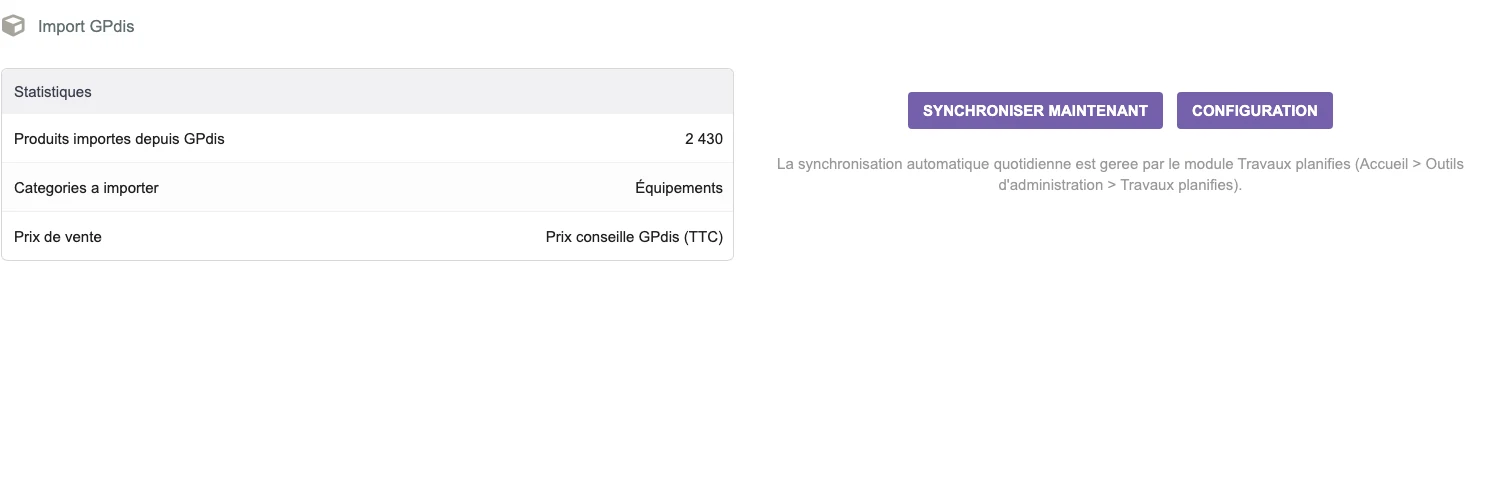
 Preparing the entry of a catalogue
The GPdis interface presents the statistics, the target category and the choice of the selling price before import.
Real interface · test environment · demo data.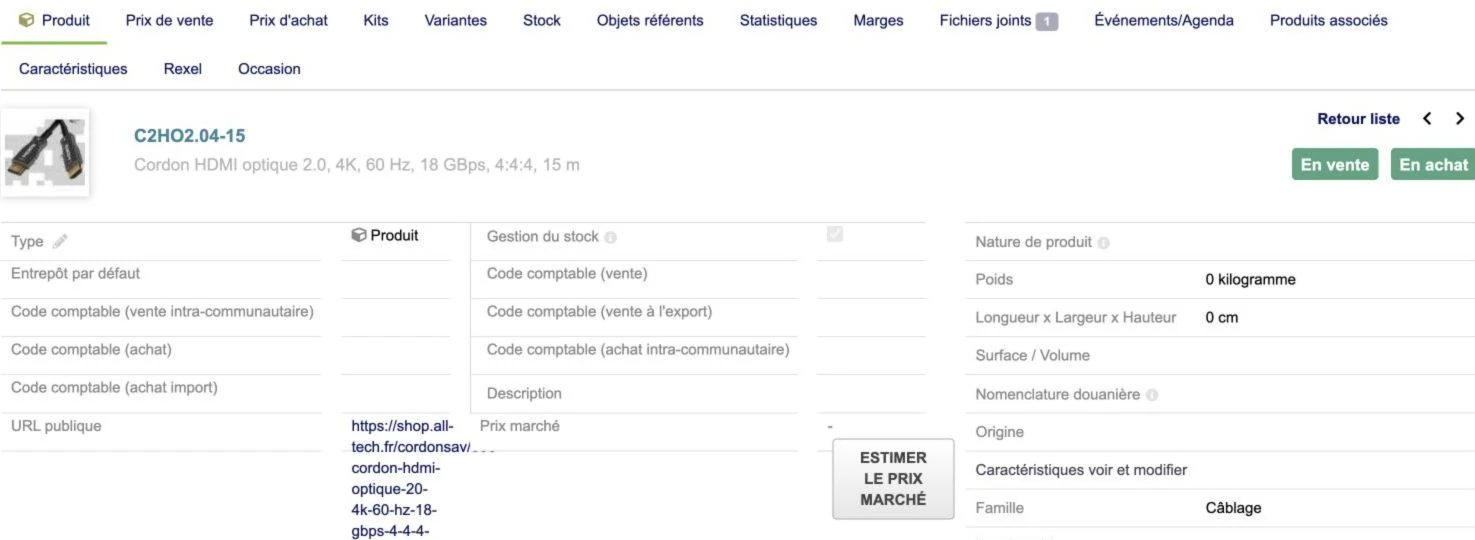 Enlarge screen
 One product, several business information
The sheet brings together the characteristics and access to prices, stock, documents and supplier information.
Real interface · test environment · demo data.Understand the available data
Vendors can offer a searchable API, files, documents, or catalog. We review available part numbers, pricing, features and availability information.
The framework specifies the rights of use and the scope of updates. Products already present in the ERP must be compared with the supplier's references.
Build useful correspondences
A supplier reference, an internal code and a product identifier do not necessarily refer to the same thing. Correspondence rules determine what can be created, enriched or updated.
The management of characteristics and units must maintain consistency for searches, quotes and orders. Unknown or ambiguous fields are identified for review.
Preparing for buying and selling flows
The integrated data can be used to research a product, prepare a quote or organize a purchase. The route must maintain the link between the source, the prices used and the reference used.
Supplier developments are coordinated with product lists, documents and ERP business rules. They are verified on representative cases before extensive treatment.
Monitoring imports and developments
The logs and reports allow you to examine the references processed, the fields ignored and the discrepancies to be covered. A relaunch must be thought of with the update rules.
Monitoring takes into account the evolution of formats and services. Documenting mappings helps maintain the connection when the vendor or application changes.
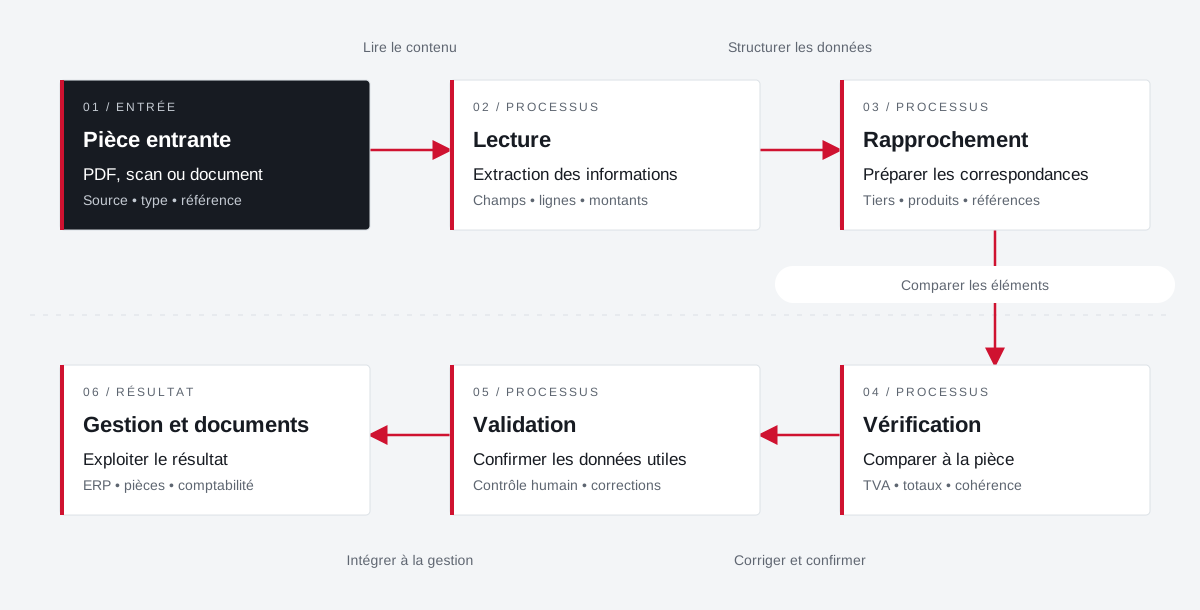
The source document accompanies the preparation of the data.
Incoming documents are reconciled with the management fields. Validation retains an explicit place before the exploitation of the result.
 Enlarge the diagram
 - 01Read content ↓
Incoming part
PDF, scan or document
Source • type • reference - 02Structure data ▼
Reading
Extraction of information
Fields • lines • amounts - 03Compare items ↓
Approximation
Preparing correspondence
Third party • products • references - 04Correct and confirm ↓
Verification
Compare to part
VAT • total • consistency - 05Integrate into management ↓
Validation
Confirm payload data
Human control • corrections - 06
Management and documents
Use the result
ERP • documents • accounting
Enlarge the diagram Keep
Keep the document visible during preparation.
Compare
Check fields and amounts against the source.
Validate
Confirm the result before its use in management.
Projects and concrete situations.
Dolibarr: from planning to reporting
Project Dtouch
Technical planning, exchanges with Zimbra and mobile vouchers: link the office, the technician and the file.
Explore the caseBusiness documents & imports in Dolibarr
Project Dtouch
Pass data from suppliers and parts received into understandable and verifiable management documents.
Explore the caseCirculate products between tools
Project Dtouch
References, categories, rates and images: A useful catalogue also depends on how its data is fed.
Explore the caseYour job deserves
the right tools.
A specific need, a software to evolve, a project to frame.