
Business planning & calendar synchronization
A business planning must take into account the stakeholders, the locations and the operations to be carried out. Dtouch develops planning routes and exchanges with the schedules used by the teams.
Concrete functions.
Tools in situ.
Interfaces used to organize work, prepare data and track files. Each screen shows a specific function, with presentation data.
 Enlarge screen
 A common view for teams
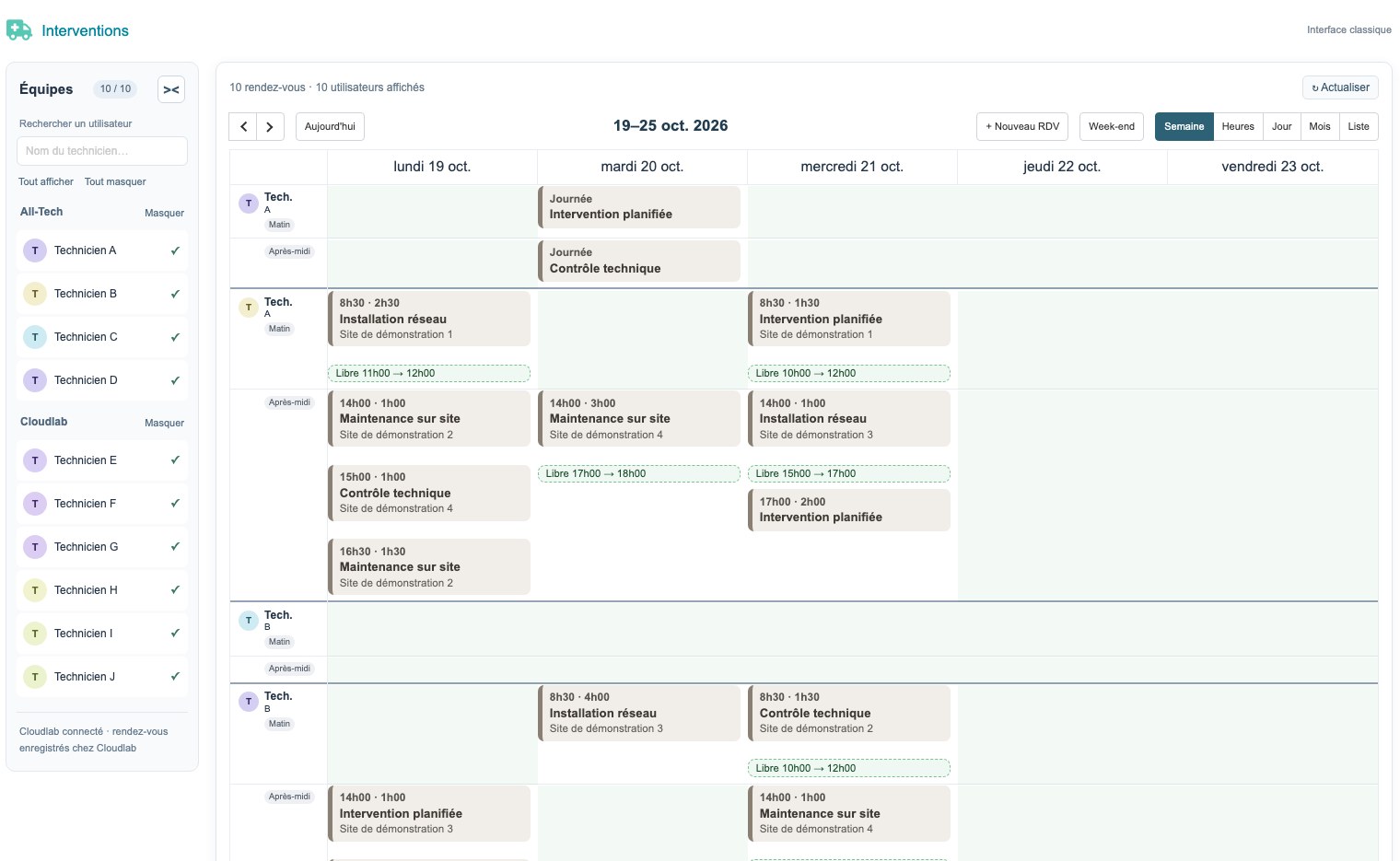
The weekly schedule brings together technicians, slots, locations and interventions.
Real interface · test environment · demo data.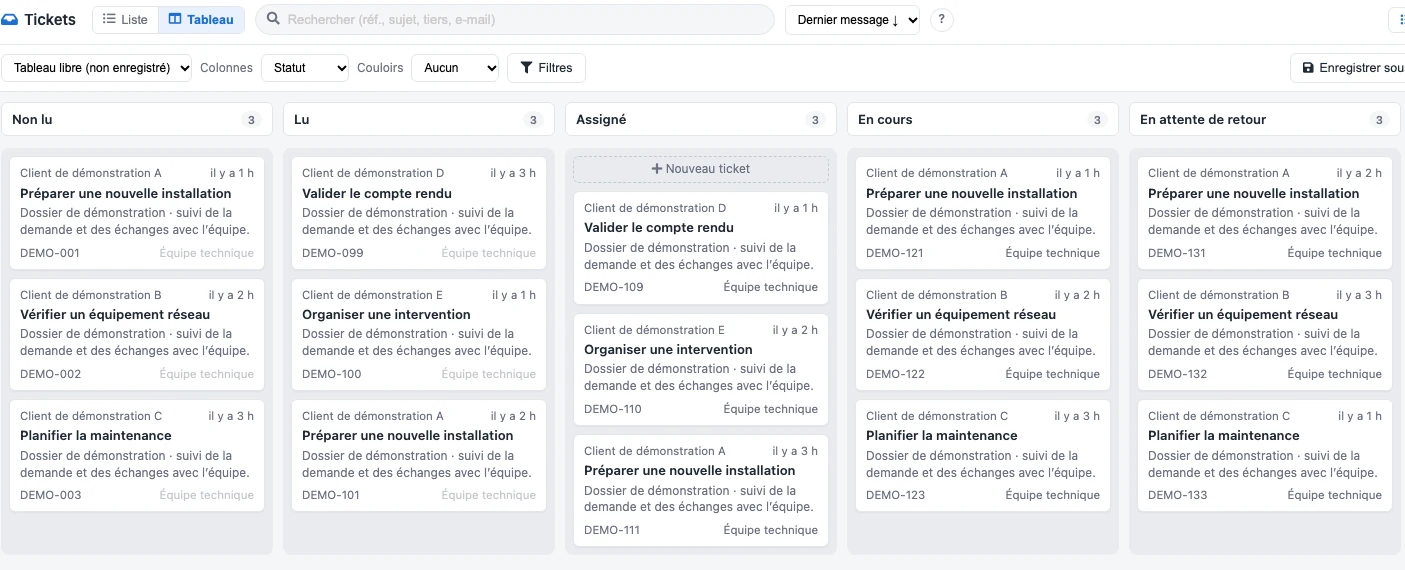 Enlarge screen
 View folder progress
Requests are grouped by status, with their subject, an overview of the exchanges and the team in charge.
Real interface · test environment · demo data.Organize an intervention in its context
The appointment is linked to a file, a place and people. The planning must present the information necessary for the preparation and execution of the intervention.
Constraints may concern the availability of a team, a recurrence, a deadline or a trip. They must be clarified with the users before being translated into the interface.
Matching business objects with agendas
Exchanges with Zimbra and CalDAV calendars are part of the supported uses. Synchronization must link the event to the business object and preserve correspondences between tools.
Creations, modifications and cancellations require explicit rules. Identifying events and processing dates is essential to avoid duplicates or mismatches.
Give managers a useful view
The schedule can bring together teams, slots and files to organize. The overview complements the detailed sheets and information available in the field.
Watchlists allow you to review operations yet to be planned and items requiring updating. Filters should meet the needs of the people distributing the work.
Check the exchanges in both tools
The recipe follows the cases of creation, movement and deletion of an appointment, depending on the scope chosen. Rights, time zones and recurrences must be taken into account.
The support specifies which tool refers and how to examine a discrepancy. Planning remains linked to production uses and management files.
The load, emergencies and milestones respond to each other.
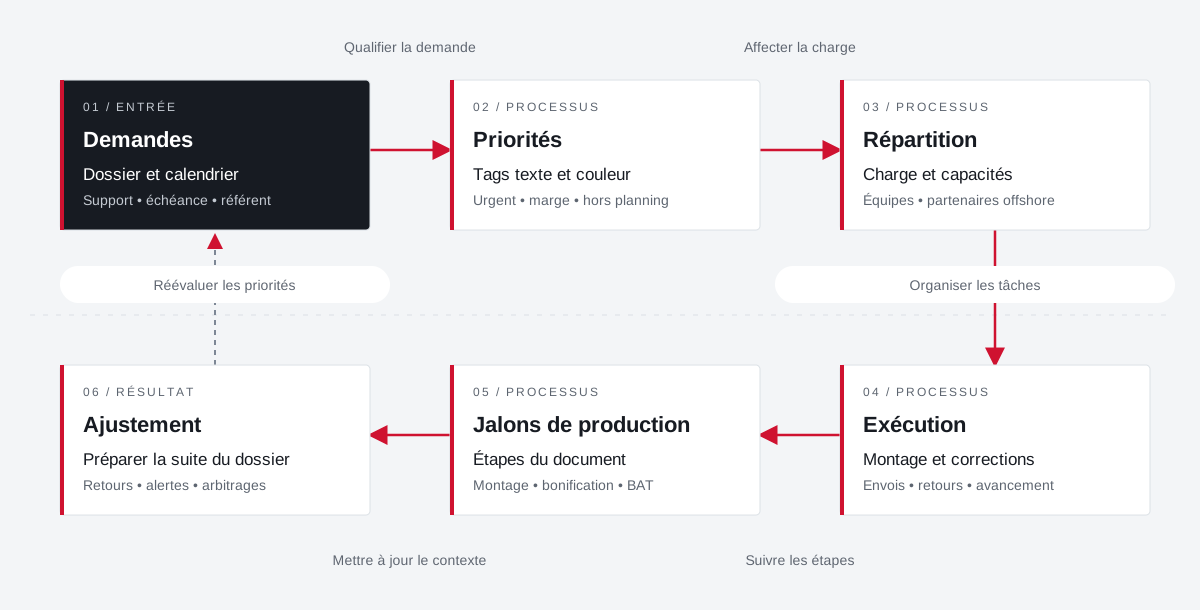
The planning links requests, priorities, internal teams and offshore partners. Feedback allows you to adjust the next steps.
 Enlarge the diagram
 - 01Qualifying the demand ▼
Requests
File and calendar
Support • deadline • reference - 02Assign load ↓
Priorities
Text and color tags
Urgent • margin • excluding schedule - 03Organize tasks ↓
Distribution
Load and capacities
Teams • offshore partners - 04Follow the steps ▼
Execution
Editing and fixes
Shipments • returns • progress - 05Update context ↓
Production milestones
Document Steps
Editing • bonus • BAT - 06
Adjustment
Preparing for the rest of the file
Returns • alerts • arbitrations
Enlarge the diagram Prioritize
Make emergencies and margins visible in tasks.
Divide
Bringing capacity and stakeholders closer together.
Adjust
Provide feedback to prepare for further production.
Projects and concrete situations.
Dolibarr: from planning to reporting
Project Dtouch
Technical planning, exchanges with Zimbra and mobile vouchers: link the office, the technician and the file.
Explore the caseBusiness documents & imports in Dolibarr
Project Dtouch
Pass data from suppliers and parts received into understandable and verifiable management documents.
Explore the caseCirculate products between tools
Project Dtouch
References, categories, rates and images: A useful catalogue also depends on how its data is fed.
Explore the caseYour job deserves
the right tools.
A specific need, a software to evolve, a project to frame.