
Editorial production planning
At Reymann, planning took the form of real business software: Rey’actif Planning. Patrice Salib, founder of Dtouch, worked with teams and developers to connect assignments, tasks, production files and studio feedback.
Rey-active Planning.
The file joins the studio.
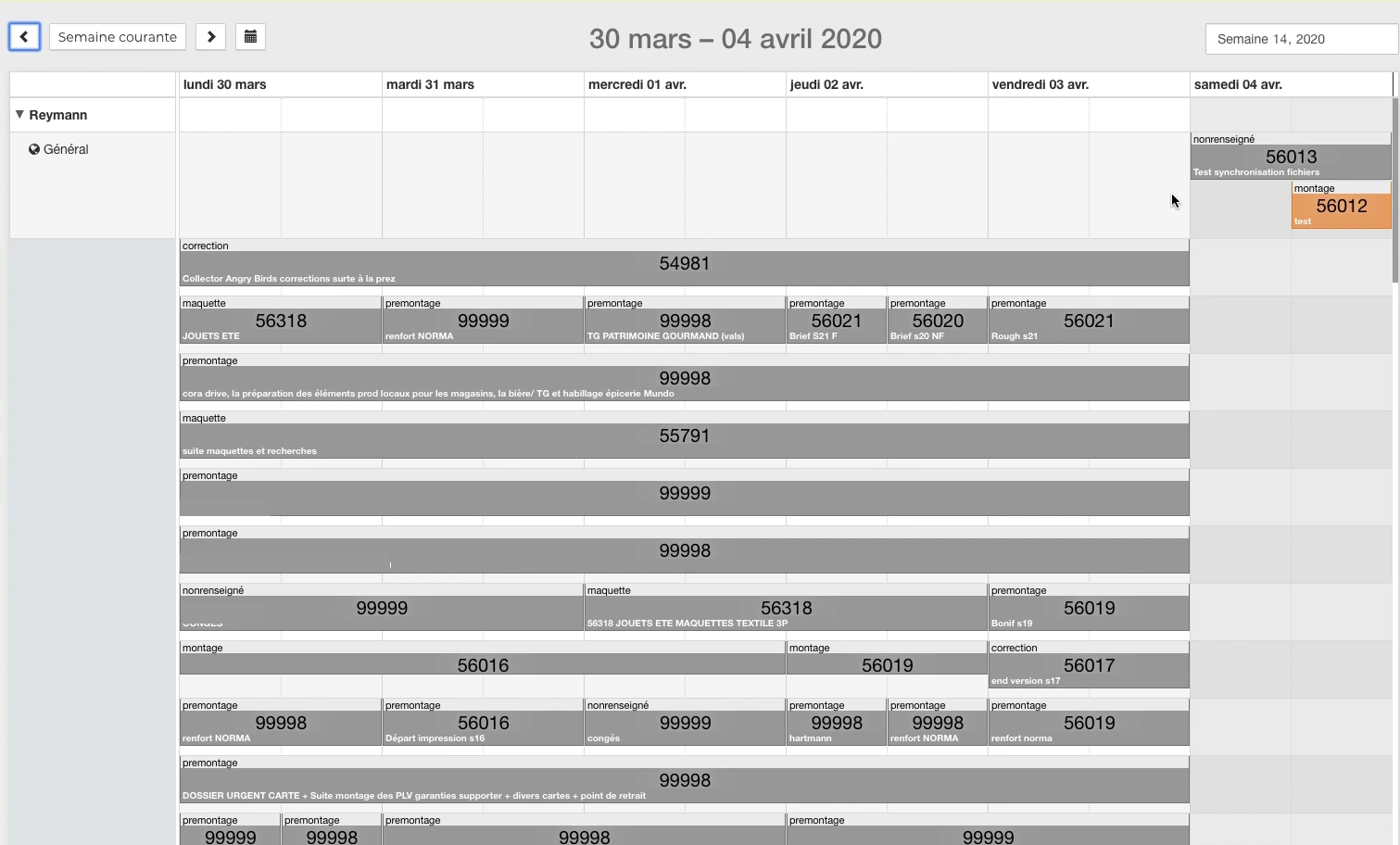
An application used to distribute work and access production files. These catches come from a 2020 demonstration of the Patrice Salib at Reymann.
 Enlarge
 - Assign work
Collaborator, slot, folder and operation type in the week view.
- Open task
Find support, folder information and Studio panel.
- Working Pages
Recover InDesign files and their resources on the studio station.
- Preparing for the next round
Return to availability commands and track file status.
 Enlarge
  Enlarge
 Files in the same location as the task.
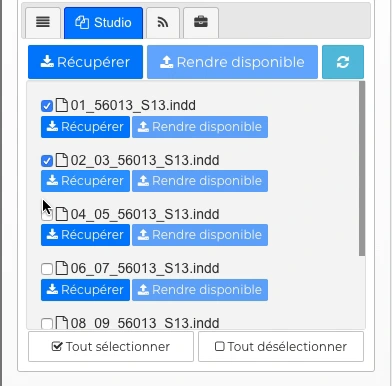
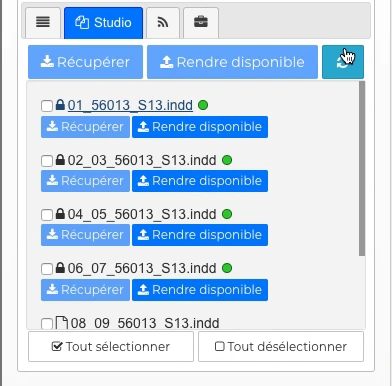
The snippet shows the list of InDesign documents, their selection, and their status indicators. Orders Recover and Make available are directly accessible in the Studio panel.
In the full demonstration, work continues in the studio folder then in InDesign, on a Norma page, before returning to the schedule.
Back to 2009 4D production tool
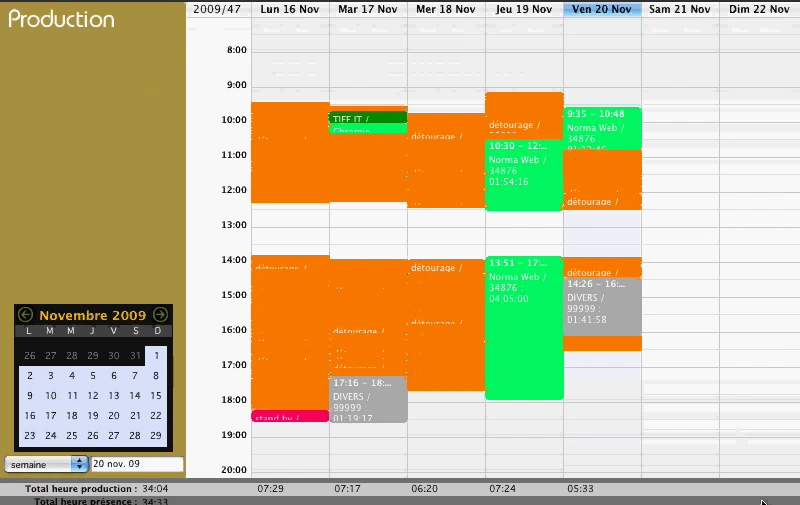
Patrice Salib's career at Reymann also includes previous production and presence monitoring tools. The November 2009 demo features separate Planning, Production, Attendance, and Basic Time views.
 Enlarge
 The burden and deadlines
in a common view.
Folder · task · referent · status · tags
Rey的active Planning: an application in the heart of the studio
The weekly view organizes tasks over time, by employee. The files and operations – model, pre-assembly, editing or correction – remain visible in the production slots. A search allows you to find a task; the list distinguishes between Planned, In Progress, Sent and Completed states.
Opening a task gives access to its information: support, date, format and referents. The planning is therefore not limited to a calendar: it maintains the context necessary to prepare the work and find the resources in the file.
Recover InDesign files from Task
The Studio panel lists the .indd files associated with the task. The Retrieve and Make Available commands exist at the folder and individual file level; boxes allow you to select the resources concerned. An indicator indicates a file different from that of the Studio; a progression accompanies the return of the files.
The 2020 demonstration follows a concrete transition from planning to the workstation: retrieval of files, presence of documents and their resources in the studio folder, opening of a Norma page in InDesign, then return to availability commands. Integration links the task, the file and the production step.
Distribute folders and actual load
The planning of the production center made it possible to organize the work of graphic designers and offshore departures. The requests from the sales teams were aligned with the schedule; booking conflicts and duplicates had to be arbitrated with the people involved.
The distribution took into account the entire file, the corrections and the availability of the workers. It could also make it possible to work on pages in parallel, by entrusting part of the editing to offshore and keeping the more specific pages in-house.
Interfaces of the Reymann editorial channel, in their period version. These archives illustrate the journey of Patrice Salib, founder of Dtouch, within the agency.
 Enlarge
 Tasks can combine color and text tags to make priorities and shipments more visible.
Archive Reymann · interface extract · 09/11/2020Making Emergencies and Margins Visible
A task could receive multiple tags, each consisting of a text and a color. The 2020 documentation describes their use to distinguish between off-planning, tasks with margin, urgency and delay of departure.
These benchmarks gave the studio a view of the load and offset possibilities. Their usefulness depended on reliable information: if all requests were presented as extremely urgent, the schedule no longer made it possible to prioritize.
Smooth shipments and track returns offshore
The 2021 production point organizes direct requests in planning, collective review, use of alerts and smoothing of departures. The objective is to prevent a one-off overload from degrading the feedback and disrupting subsequent corrections.
A delay in text or client correction changes the reality of the work planned. The initial tasks must be cancelled or moved, a new deadline communicated, and what can be produced re-evaluated. Tasks, files sent and returns must remain consistent.
Linking milestones to platform behaviour
Planning also had a functional dimension in Rey’actif. Automatic actions were associated with assembly end dates, BAT enhancements or corrections. In particular, they could unlock the pages at the planned milestone.
Planning therefore goes beyond reserving a slot: a deadline can change what teams are authorized to correct or present. The setting must be understood and controlled to avoid an unexpected change of state.
Integrate calendar, projects and absences
Technical work on planning covered calendars, Gantt-type views and fields specific to Reymann projects. An integration study with Nextcloud examined calendar entry points and its WebDAV exchanges; the finalization of the prototype and its porting were then distinct stages.
The application scope subsequently followed included internal planning and offshore sending, as well as a mechanism for synchronizing leave from payroll tool notifications. The available capacity had to meet the planned load.
A tool that accompanies the organisation
Planning reviews, feedback on masks, recurring errors and alerts fuel production improvement. The tool provides common information; the team retains responsibility for refereeing.
This experience provides a concrete reading of the needs of a business planning: file, task, capacity, priority, dependency, alert and feedback. It continues today in the management tools and integrations developed by Dtouch.
Continuity from 4D production tools
A demonstration in November 2009 already presents separate weekly views for planning, production, presence and basic times. The production screen brings together the operations, their durations and the totals of the week.
These 4D views and Rey’actif Planning in 2020 correspond to different stages of Patrice Salib’s journey at Reymann. They show the same attention to the tools actually used: planning the work, monitoring its completion and giving the teams the means to move forward.
The load, emergencies and milestones respond to each other.
The planning links requests, priorities, internal teams and offshore partners. Feedback allows you to adjust the next steps.
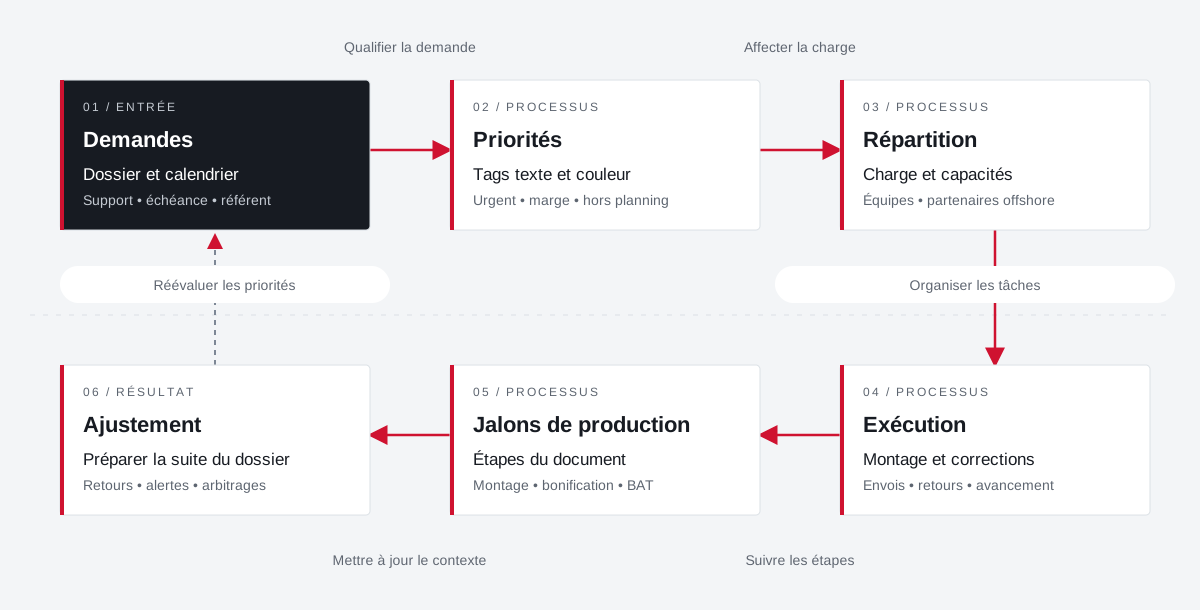 Enlarge the diagram
 - 01Qualifying the demand ▼
Requests
File and calendar
Support • deadline • reference - 02Assign load ↓
Priorities
Text and color tags
Urgent • margin • excluding schedule - 03Organize tasks ↓
Distribution
Load and capacities
Teams • offshore partners - 04Follow the steps ▼
Execution
Editing and fixes
Shipments • returns • progress - 05Update context ↓
Production milestones
Document Steps
Editing • bonus • BAT - 06
Adjustment
Preparing for the rest of the file
Returns • alerts • arbitrations
Enlarge the diagram Prioritize
Make emergencies and margins visible in tasks.
Divide
Bringing capacity and stakeholders closer together.
Adjust
Provide feedback to prepare for further production.
From planning to return
offshore production.
Queues for sending visuals, InDesign documents, replication of returns and controls in the file.
Explore offshore flowsProjects and concrete situations.
Your job deserves
the right tools.
A specific need, a software to evolve, a project to frame.