
Colorimetry & ICC profiles
Color flows through images, layout tools, proofs and printing. We integrate its parameters into the operation of the production line.
The tools of the
editorial production.
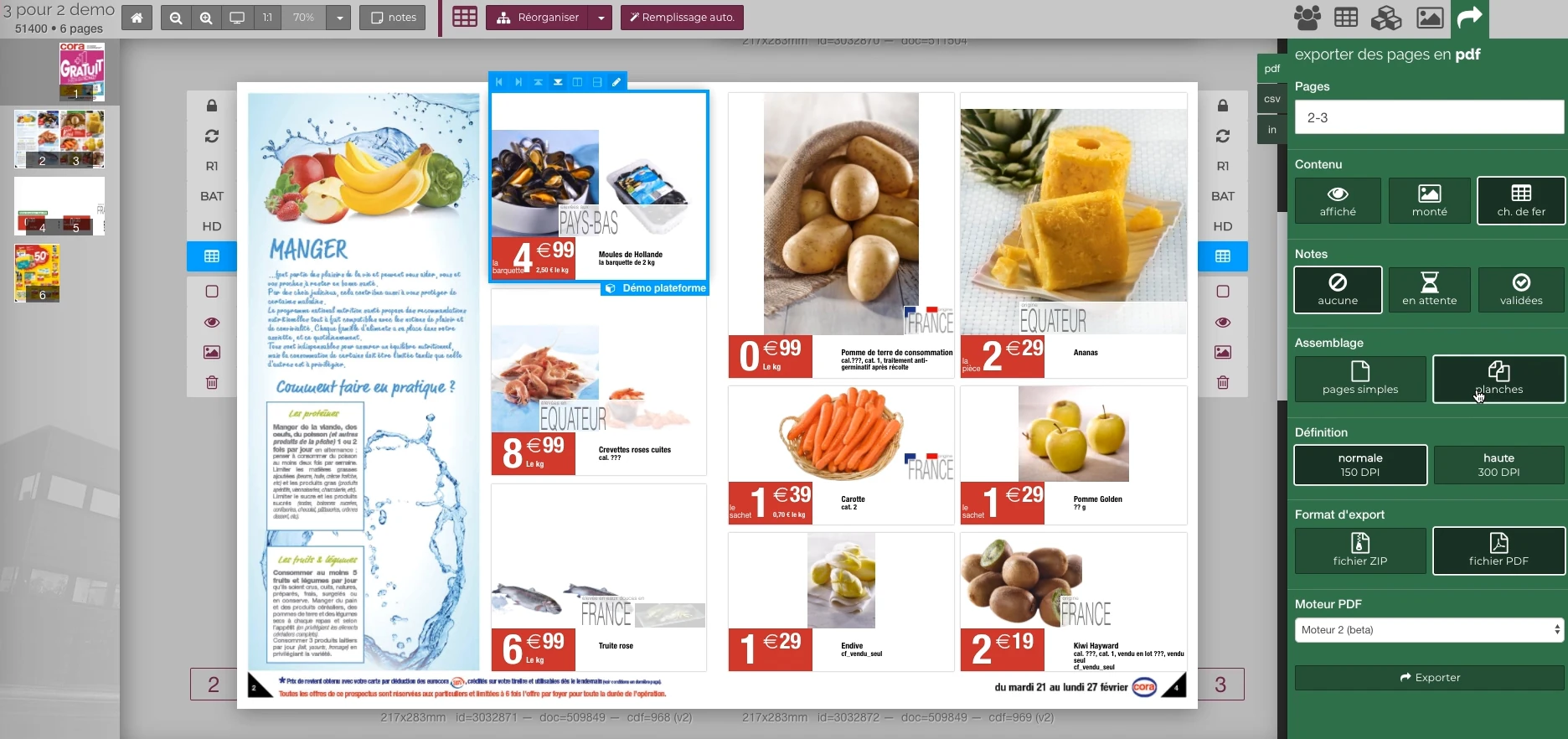
These Rey’actif views situate the functions in the editorial chain: products, images, pages and validation. They come from a demonstration of the platform in 2018.
 Enlarge screen
 Preparing the output of the document
The document remains visible next to the PDF output panel and the parameters offered in the platform.
Real Rey’actif interface · demo archive from 2018.Output Profile A
Depending on paper and manufacturing
Output profile B
Depending on paper and manufacturing
Connecting the color to the manufacturing context
Preparing a visual depends on its origin, its workspace and its destination. The paper, the process and the printer's instructions are involved in the choice of the output profile.
Patrice Salib's journey at Reymann includes exchanges between manufacturing, engraving, retouching and development around these parameters. The topics covered ranged from choosing the RGB work space to setting up the profiles necessary for a file.
Train teams in ICC profiles
Patrice Salib's practice also includes training in color management. A lively day on site in 2014 combined ICC principles, printing processes, screen calibration, RGB/CMYK differences and use in Adobe and Acrobat.
Transmission is part of the work: explaining the role of the profiles, making the settings understandable and sharing a preparation method with the teams who exchange their files with the printers.
A practice of heliogravure and rotary offset
The files followed at Reymann included productions intended for rotogravure and rotary offset, on a scale of runs of several million copies. The technical definition of the support had to join the profiles, exports and tests.
This experience includes the separation of color layers, spot colors and layer printing controlled from the editorial platform. ICC profiles and proofing are two related components of print preparation.
Interfaces of the Reymann editorial channel, in their period version. These archives illustrate the journey of Patrice Salib, founder of Dtouch, within the agency.
 Enlarge
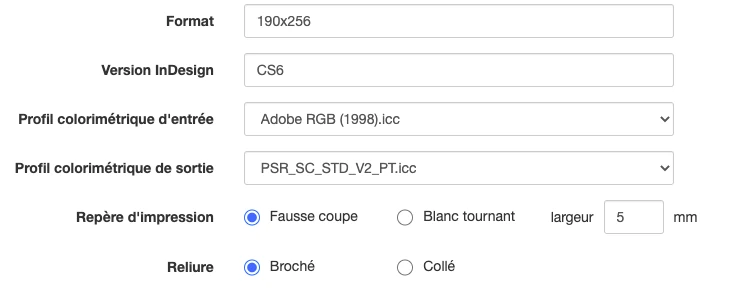
 The format, InDesign version, input and output profiles, print marks and binding are defined at the media level.
Archive Reymann · interface extract · 06/16/2021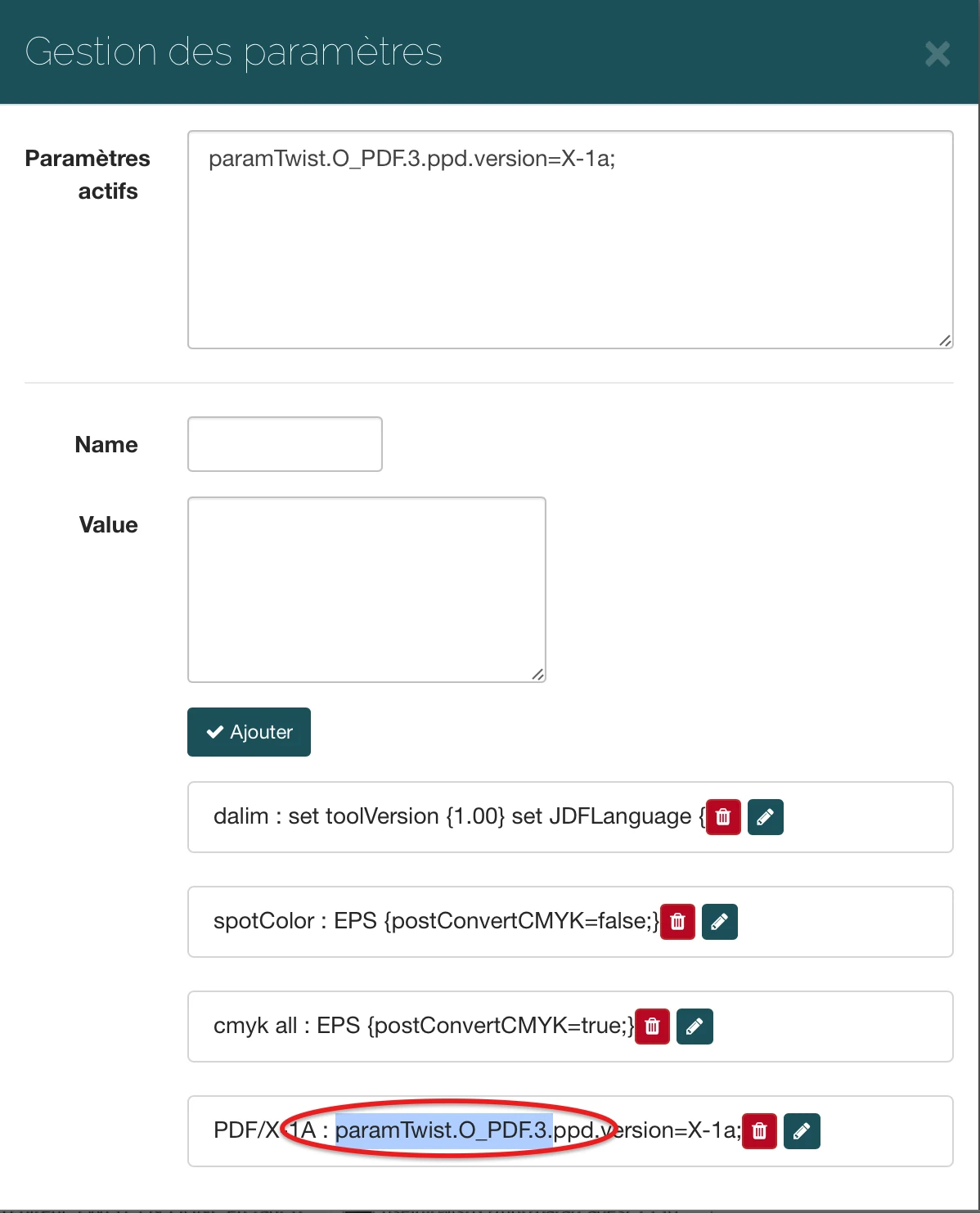 Enlarge
 The interface allows you to specify the parameters transmitted to the processing flow, here a PDF/X-1a output option.
Archive Reymann · interface extract · 03/22/2019Normalize entries and verify profiles
The 2015 image centralization work focused on a format shared between agencies: common dimensions, RGB space, incorporated profile, clipping path and nomenclature combining radius, product reference and index. This standardization was to make the files reusable in the photo library and in productions.
The normalization of incoming images also included several checks: RGB or CMYK space, presence of a profile, consistency between the profile and the data, then conversion to the workspace. Non-profile cases require a decision from the context of the case, rather than a conversion applied without review.
Distinct profiles in the same catalog
Cover and interior may have different printing conditions. At Reymann, Patrice requested and accompanied in 2016 the establishment of a separate profile for the cover and interior of the document.
This example summarizes the business need: the setting must follow the part of the document concerned. A single value across the entire catalog is not always enough. The profiles are selected according to the project's manufacturing specifications.
Put the parameters in the exports
The InDesign export scripts studied in this channel included an input profile, a destination profile and a PDF preset, with high definition or viewing output. The processing also included updating ICML links, bleeds and benchmarks necessary for production.
The challenge is to make the correct configuration reproducible: the output choice must accompany the document and its versions, rather than depending on a succession of individual manipulations.
Control Dalim TWIST from file data
The redesign of the Dalim TWIST flows replaced around twenty historical flows with common 4D and Rey’actif flows. Scripts queried Rey’actif via REST to configure the production tools on the fly according to the technical definition of the file or medium.
The scope included the automatic management of ICC profiles of processed files and the addition of the profile used on the proofs. The color rule thus joined the business interface, the processing engine and the control document.
A correction must be made up to reprocessing
One incident in 2013 involved an inappropriate source profile in controlled work with Apoove. Correcting the configuration was not enough: the page had to be retired for the change to apply, with a new version to take into account.
This experience links colorimetry to production monitoring: identify the parameter concerned, measure the affected files, restart processing then check the version actually proposed for validation.
Share a rule that teams can understand
Retouching, engraving, layout and remote stakeholders must share the same preparation instructions. We are working on their translation into settings, templates and validation circuits.
The examples presented come from historical productions. For a new folder, profiles and settings are defined from the printer's current files and specifications, then verified in the channel used.
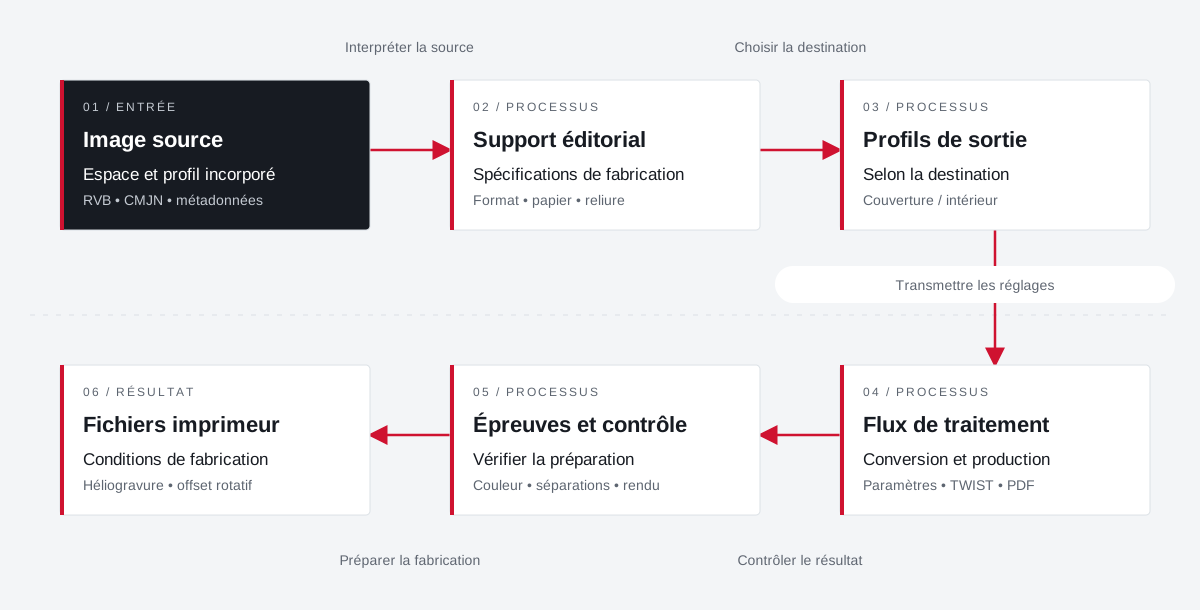
Profiles match media settings and outputs.
The input space, paper, and print destination are processed together. Cover and interior may require separate adjustments.
 Enlarge the diagram
 - 01Interpret the source ↓
Source image
Space and embedded profile
RGB • CMYK • metadata - 02Choose destination ↓
Editorial material
Manufacturing specifications
Format • paper • binding - 03Transmit settings ▼
Output profiles
Depending on destination
Cover / interior - 04Check the result ↓
Processing flow
Conversion and production
Settings • TWIST • PDF - 05Preparing for manufacturing ▼
Tests and testing
Check preparation
Color • separations • rendering - 06
Printer files
Manufacturing conditions
Rotogravure • rotary offset
Enlarge the diagram Source
Identify the profile and space of the images to be processed.
Destination
Bring together the profiles of the paper and printer instructions.
Team
Share settings and explain their effects on outputs.
The Reymann route,
in detail.
How images, color, applications and partners fit together in the Rey’actif channel.
Explore this experienceProjects and concrete situations.
Cora: structuring a common photo library
Founder's Experience · Reymann
Define images that can circulate between several agencies and several uses: formats, color profiles, product references, clipping and nomenclature.
Explore the caseReymann : from schedule to studio InDesign files
Founder's Experience · Reymann
Rey-Active Planning brought together assignments, folders and access to studio files. A business application related to production, with weekly view, task statements and commands for recovery and availability of InDesign documents.
Explore the caseFrom offshore clipping to image ready for publication
Founder's Experience · Reymann
Follow an image from his assignment to the claimant to high definition and the insights available on the platform.
Explore the caseYour job deserves
the right tools.
A specific need, a software to evolve, a project to frame.