
ICC training & transfer of know-how
Training in ICC profiles and color management, with Reymann teams and colleagues: transmitting practices in a company of more than 100 people, in contact with production constraints.
The tools of the
editorial production.
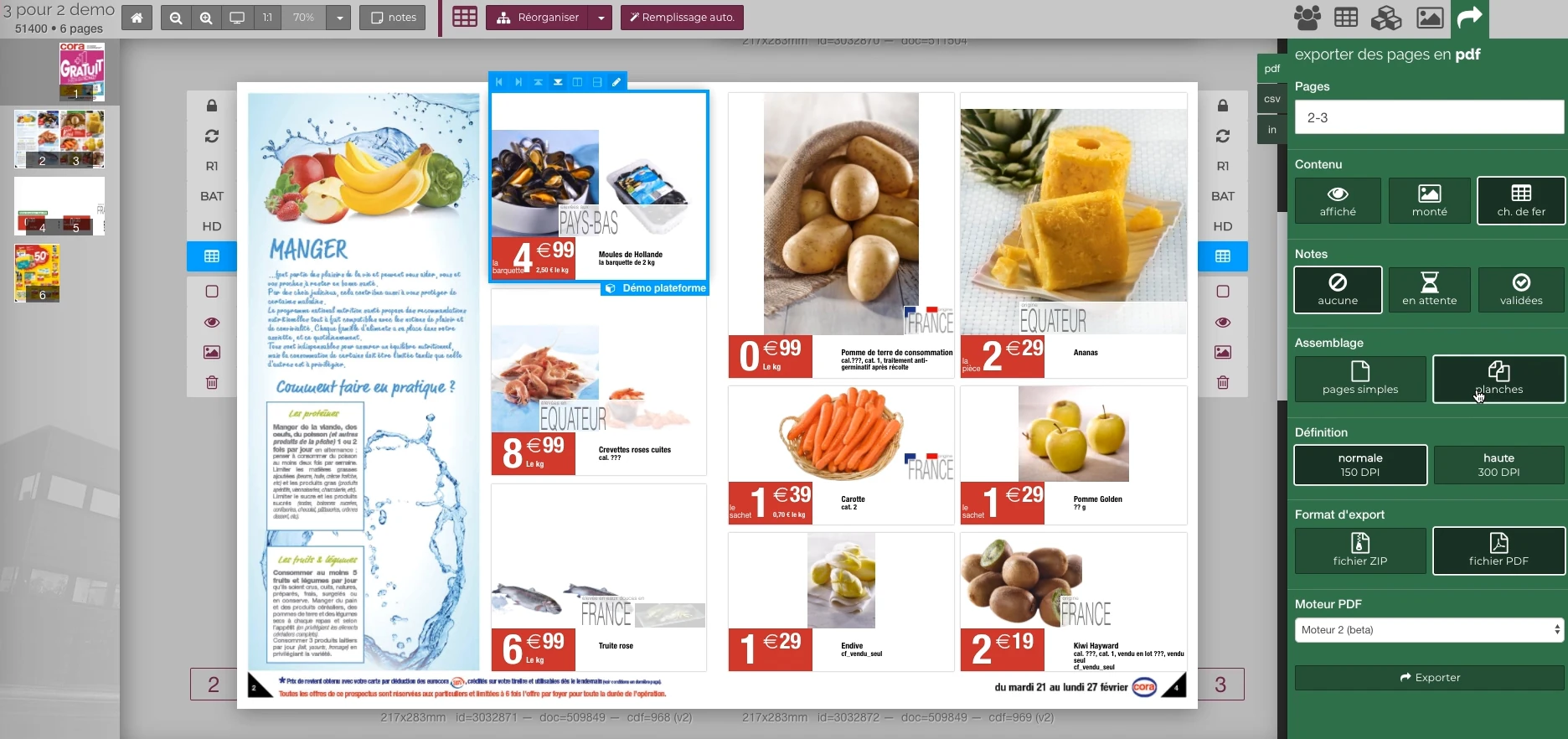
These Rey’actif views situate the functions in the editorial chain: products, images, pages and validation. They come from a demonstration of the platform in 2018.
 Enlarge screen
 Preparing the output of the document
The document remains visible next to the PDF output panel and the parameters offered in the platform.
Real Rey’actif interface · demo archive from 2018.Train with Reymann teams and colleagues
Patrice provided training on ICC profiles with Reymann teams and colleagues, within a company of more than 100 people. This transmission was part of the agency's collective work: understanding the profiles, settings and the consequences of a color choice on files and output.
The role of trainer completes the technical interventions on images, colorimetry and the editorial chain.
An on-site trainer experience
Patrice Salib also led professional training dedicated to ICC profiles and their use in the graphics chain. A one-day session, organized on site in November 2014 with a training partner, addressed the relationship between files, software and printers.
This transmission experience completes production practice at Reymann: explaining choices, providing common benchmarks and making teams more autonomous with regard to color parameters.
Understanding profiles and printing processes
The program started from the use of ICC with printers: principles of profiles, search for the right file and relationship with manufacturing processes. The objective was to enable participants to understand the information necessary for coherent preparation.
Knowing the medium and the destination gives meaning to the settings. This approach is similar to the productions followed in rotogravure and rotary offset, where the instructions in the file and those of the printer must remain explicit.
Interfaces of the Reymann editorial channel, in their period version. These archives illustrate the journey of Patrice Salib, founder of Dtouch, within the agency.
 Enlarge
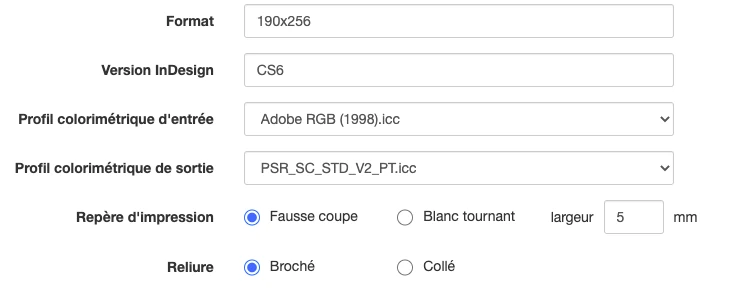
 The format, InDesign version, input and output profiles, print marks and binding are defined at the media level.
Archive Reymann · interface extract · 06/16/2021Link screen, RGB and CMYK
Screen calibration and the differences between RGB and CMYK were among the topics of the day. Workspaces and exit conditions had to be understood as elements of the same chain.
The training also covered working in RGB before preparing for release. The production examples help explain why a setting cannot be chosen independently of the file, the profile and its destination.
Moving from principles to Adobe and Acrobat tools
The program included the use of ICCs in Adobe applications and Acrobat. The challenge was to help the teams find the parameters and understand what they controlled before transmitting the file.
This pedagogy extends to the subjects encountered in production: file profiles, consultation and printing files, proofs, color layers and versions to be validated.
Transmit a method adapted to the teams
A technical rule becomes useful when people who prepare, correct and validate files can apply it. Accompaniment therefore links the principles to the examples of the profession: what to verify, what information to ask for and how to deal with an inconsistency.
In integration and editorial production projects, this transmission capacity facilitates the passage between developers, graphic designers, manufacturing and users. It allows the operation to be documented and the same benchmarks to be shared.
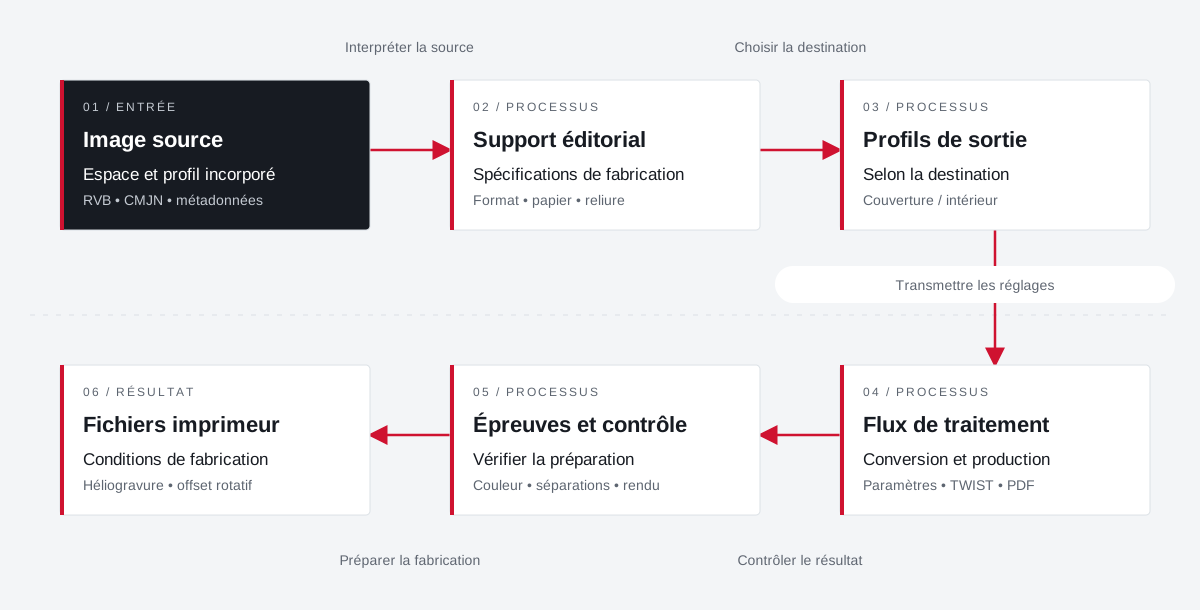
Profiles match media settings and outputs.
The input space, paper, and print destination are processed together. Cover and interior may require separate adjustments.
 Enlarge the diagram
 - 01Interpret the source ↓
Source image
Space and embedded profile
RGB • CMYK • metadata - 02Choose destination ↓
Editorial material
Manufacturing specifications
Format • paper • binding - 03Transmit settings ▼
Output profiles
Depending on destination
Cover / interior - 04Check the result ↓
Processing flow
Conversion and production
Settings • TWIST • PDF - 05Preparing for manufacturing ▼
Tests and testing
Check preparation
Color • separations • rendering - 06
Printer files
Manufacturing conditions
Rotogravure • rotary offset
Enlarge the diagram Source
Identify the profile and space of the images to be processed.
Destination
Bring together the profiles of the paper and printer instructions.
Team
Share settings and explain their effects on outputs.
Color, profiles and manufacturing:
a chain to understand.
Find out how these topics fit the platform parameters and production controls.
Explore colorimetryProjects and concrete situations.
Cora: structuring a common photo library
Founder's Experience · Reymann
Define images that can circulate between several agencies and several uses: formats, color profiles, product references, clipping and nomenclature.
Explore the caseReymann : from schedule to studio InDesign files
Founder's Experience · Reymann
Rey-Active Planning brought together assignments, folders and access to studio files. A business application related to production, with weekly view, task statements and commands for recovery and availability of InDesign documents.
Explore the caseFrom offshore clipping to image ready for publication
Founder's Experience · Reymann
Follow an image from his assignment to the claimant to high definition and the insights available on the platform.
Explore the caseYour job deserves
the right tools.
A specific need, a software to evolve, a project to frame.