
InDesign Server & document generation
InDesign Server transforms data and templates into production documents. Our experience focuses on its integration into the editorial chain, its processing and its monitoring.
The tools of the
editorial production.
The editorial interface shows the work on the pages and their output, upstream and downstream of composition processing. Rey’actif demonstration archives, 2018.
 Enlarge screen
 From the product to its location on the page
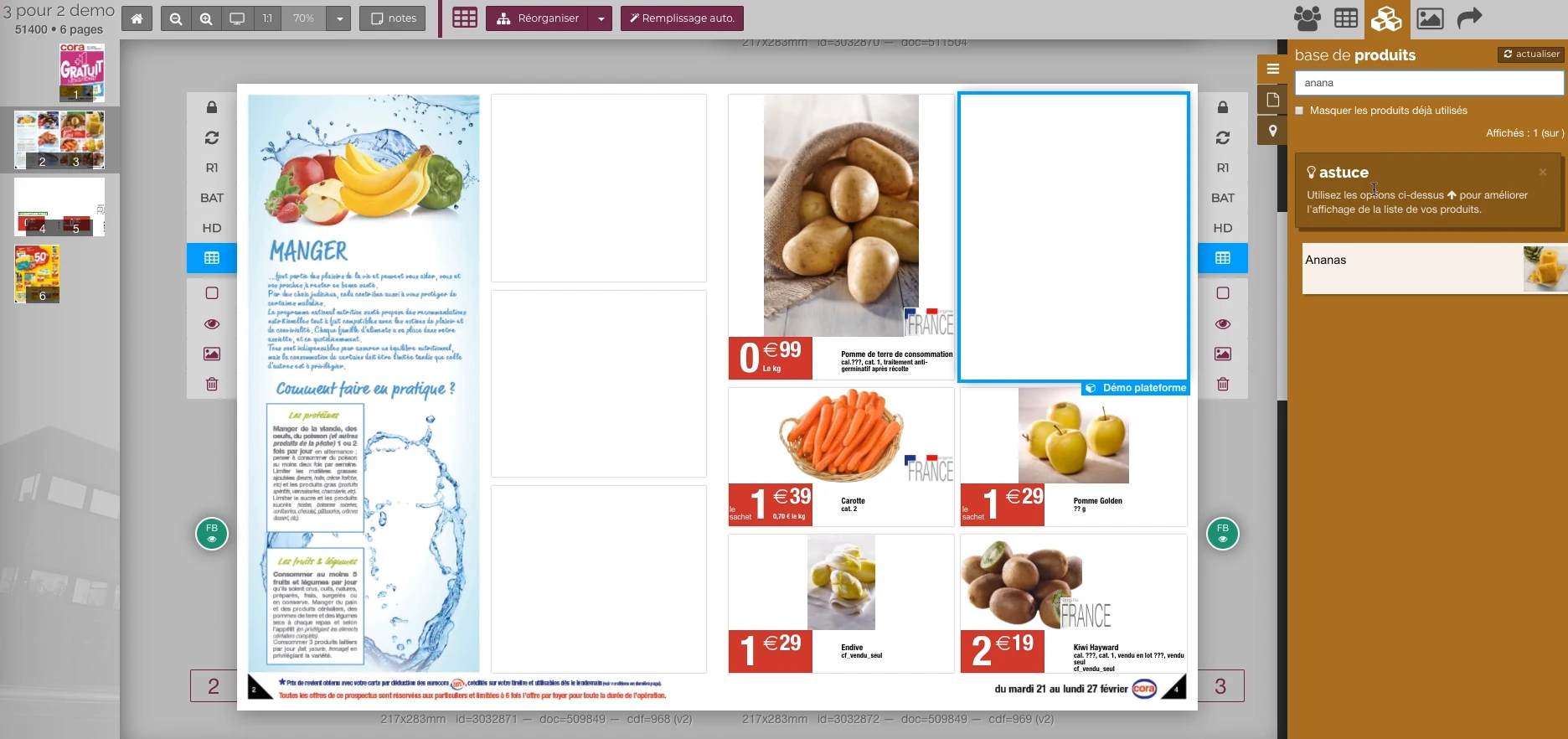
The double page, the thumbnail and the product base allow you to work in the context of the publication.
Real Rey’actif interface · demo archive from 2018.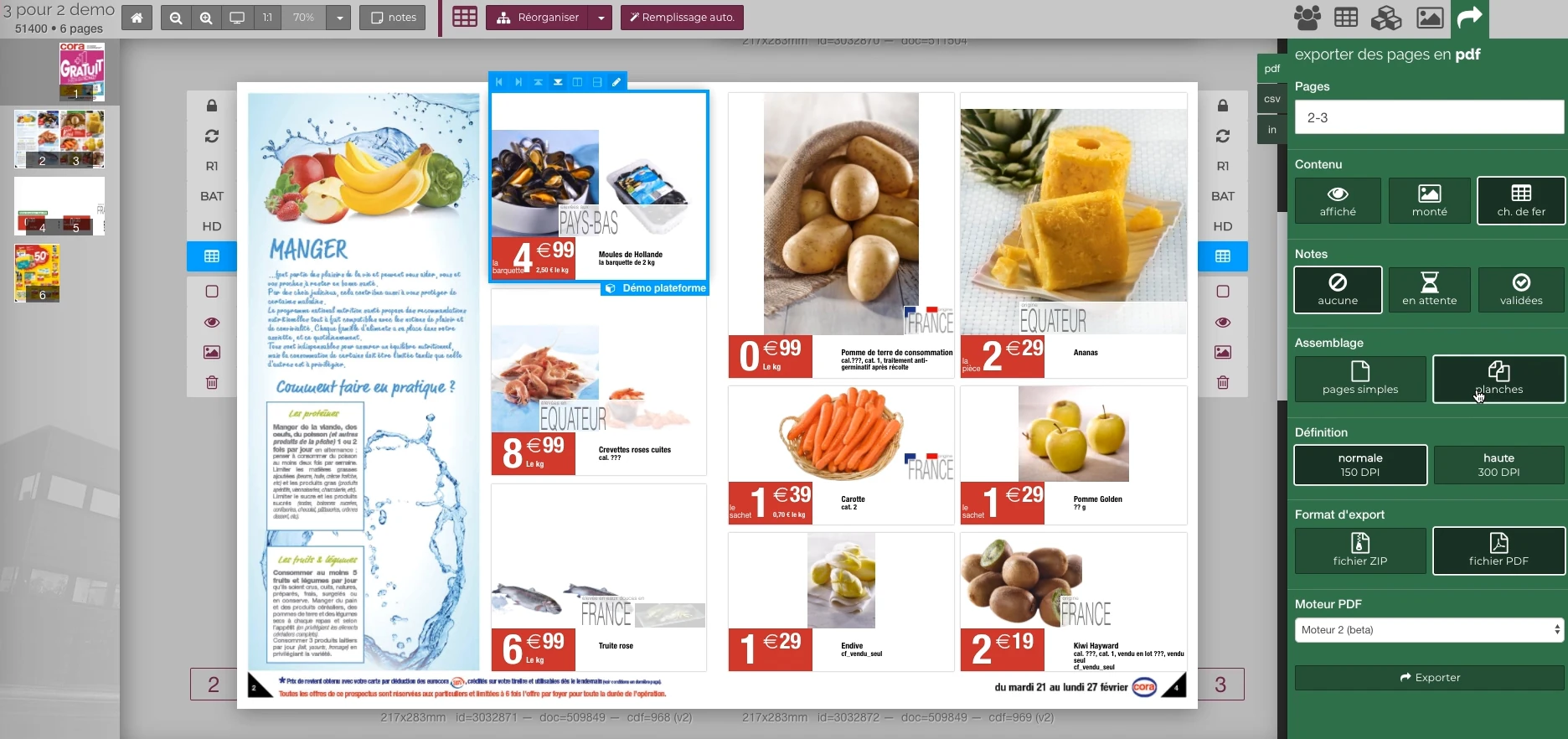 Enlarge screen
 Preparing the output of the document
The document remains visible next to the PDF output panel and the parameters offered in the platform.
Real Rey’actif interface · demo archive from 2018.Linking editorial demand to the composition engine
The generation request starts from a folder, a medium or pages. The engine must find the necessary templates, texts, images and variants. The expected result could be a page to view, an InDesign document to rework, or a PDF for manufacturing.
At Reymann, InDesign Server was part of a set of services linked to Rey’actif. The scope included several generation environments, processing managers and tools that checked the modifications of the INDD files and the status of the PDFs.
UTS: making typographies available in InDesign Server
The Reymann course includes reverse engineering around Universal Type Server to connect the typ library to the InDesign Server generation. Patrice carried out this work with the technical team, with the aim of finding the fonts necessary for the documents on the server.
Font availability is a production dependency: a missing family or wrong variant can change prices, line wraps, and page balance. PTO tests, alerts and checks complete the connection.
Prepare data and masks before generating
An automated composition depends on what feeds: correctly informed fields, conditional rules, styles, masks and ready visuals. Production returns highlight the importance of preparing masks before demand and respecting the time required to process images.
This preparation is linked to studio planning and offshore shipments. A generation without the expected visuals requires reimporting or remounting afterwards; the tool must therefore be part of a production order understood by the teams.
Interfaces of the Reymann editorial channel, in their period version. These archives illustrate the journey of Patrice Salib, founder of Dtouch, within the agency.
 Enlarge
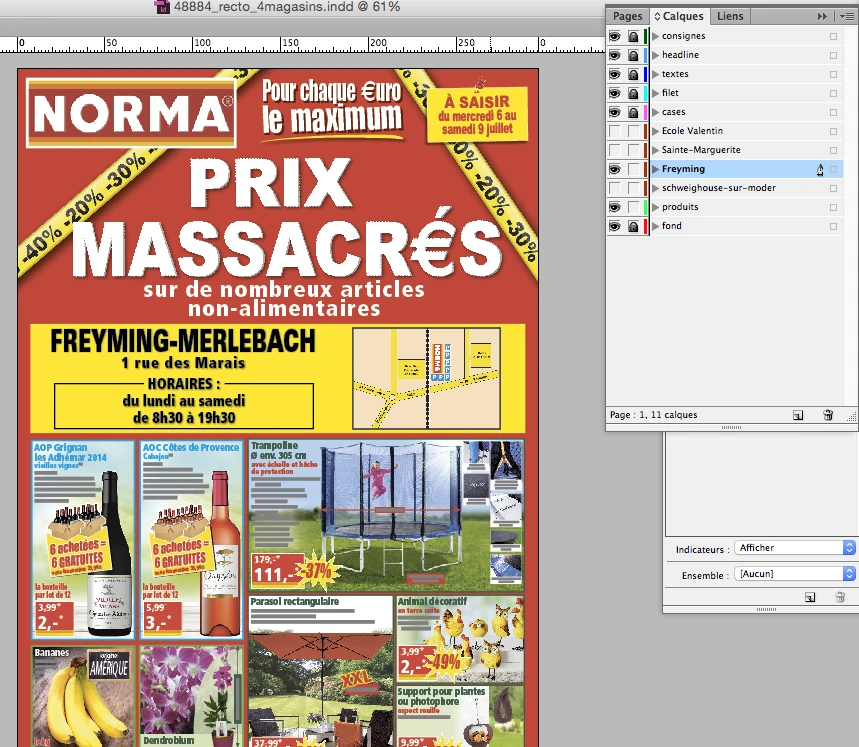
 The InDesign document keeps common elements and store variations in separate layers.
Archive Reymann · interface extract · 06/21/2016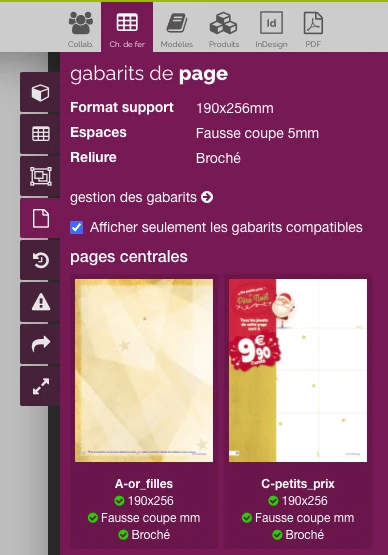 Enlarge
 The filter brings the templates closer to the format, binding and technical margins expected for the catalog.
Archive Reymann · interface extract · 06/16/2021Manage linked texts and variations
The environments used combined 4D or PIM data, ICML, XML and layout tools. Linked texts allow you to maintain a relationship with the source data. You must check their content and update modified links before the document is released.
Editorial rules may change depending on a product family or version: mention of origin, warranty, reference or price information. The templates and layers must retain this logic when taken over by a graphic designer or a partner.
Automate exports with folder settings
Production scripts handled page choice, PDF preset, input and destination profiles, definition and manufacturing parameters. The high definition and consultation versions responded to distinct uses.
The export also followed the update of the document links. A change to the text, profile or layout requires checking the regenerated output, and not allowing an old version to circulate through the validation circuit.
Making treatments workable
A generation must leave an understandable state: application received, processing in progress, product document or error to be repeated. Tools around the InDesign Server included document and PDF control, event exchanges, and diagnostic logs.
Monitoring also includes saving the generated INDD documents. A document composed but not saved does not constitute the same result as a file available for resumption in production. This difference must be visible in operation.
Retrieving documents not attached to the platform
The chain included a volume control to identify InDesign files not saved in Rey’actif. The result triggered a notification and gave access to a correction interface: find the documents by operation, select the medium and reestablish their connection in the platform.
This case distinguishes between two problems: producing a valid INDD file and ensuring that the organization knows which folder and medium it belongs to. The controls of the document and its business links must go together.
Articulate composition, recovery and printing
Server generation and work on the graphic designer's workstation complement each other. Desktop connectors, associated files and recovery tools should allow you to recover the correct material. Exports and assemblies then join the platform and proofing services.
This experience is used for automation projects for catalogs, cards and variant documents, when the fidelity of the layout and the consistency of the data are as important as the number of files produced.
Assemble PDFs and produce control views
Additional processing ensured the assembly and editing of PDF files in a model defined by production, as well as the creation of contact sheets. These functions have been organized in the form of scripts and a Node.js library for their integration into the services.
The course also extended to the automatic generation of flipbooks. Consultation formats and manufacturing documents remained separate outputs, connected to the same files.
From the product repository to the manufacturing file.
Products, visuals, templates, typographies and output parameters join a production followed by document and version.
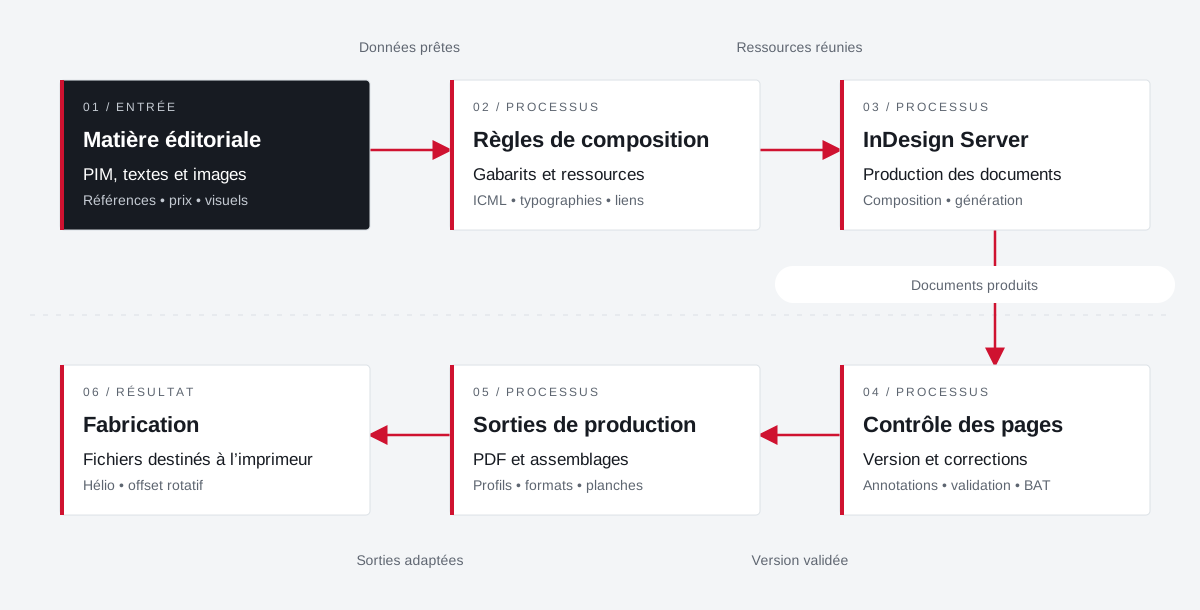 Enlarge the diagram
 - 01Data ready ↓
Editorial material
PIM, texts and images
References • price • visuals - 02Resources combined
Composition rules
Templates and resources
ICML • typographies • links - 03Documents produced ↓
InDesign Server
Production of documents
Composition • generation - 04Validated version
Page control
Version and corrections
Annotations • validation • proof - 05Adapted outputs ▼
Production outputs
PDFs and assemblies
Profiles • formats • boards - 06
Manufacturing
Files for the printer
Helio • rotary offset
Enlarge the diagram Compose
Bring data and resources closer to the template.
Validate
Follow the pages and corrections in their version.
Make
Apply media and printer specifications.
Data, visuals
and the page together.
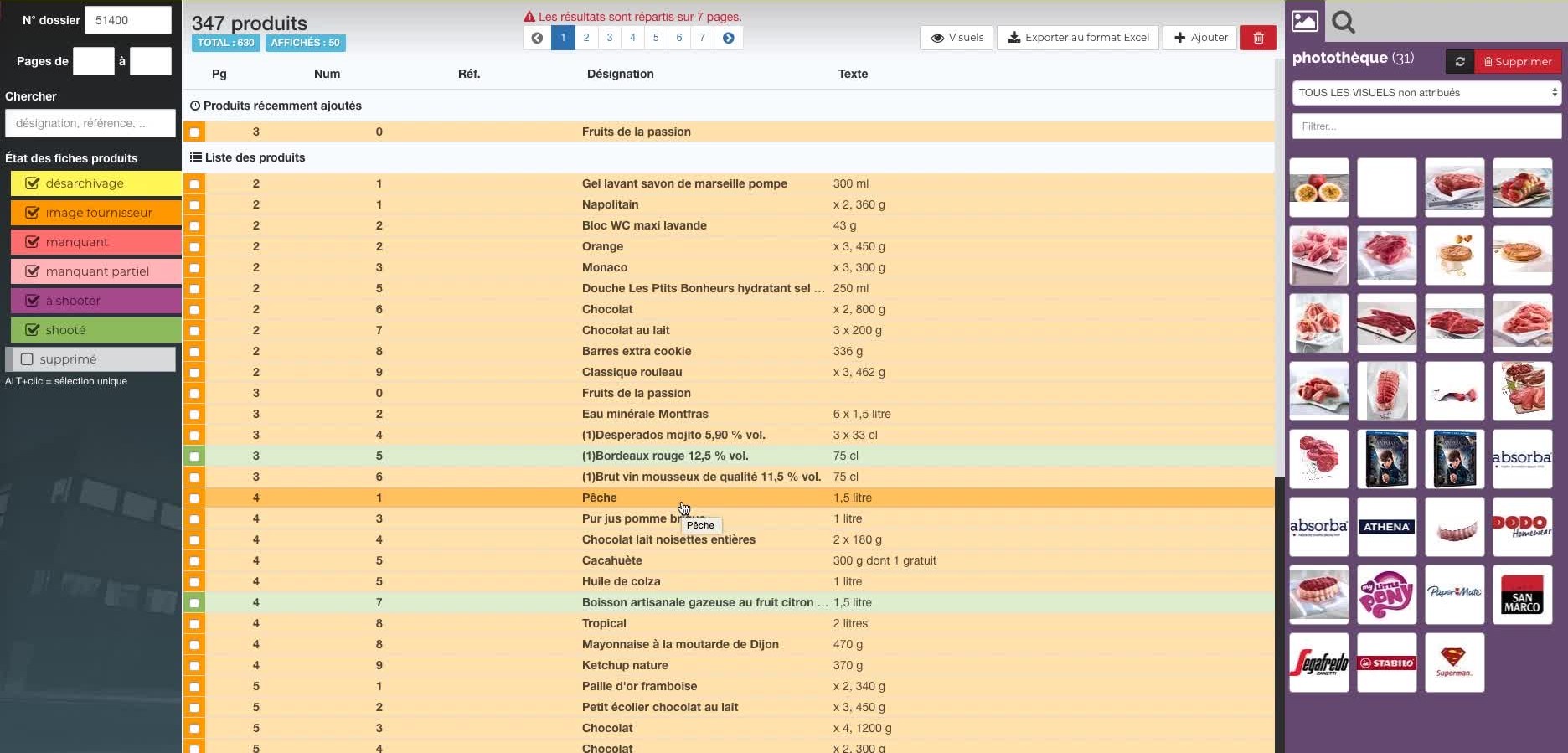
Two demonstration views of Rey’actif in 2018: the repository with its photo library, then the document and its export options.
 Enlarge
 Projects and concrete situations.
Reymann : editorial platform & production with wide distribution
Founder's Experience · Reymann
An experience in publishing management and printing preparation to several million copies, in heliogravure and rotary offset.
Explore the caseDalim TWIST: unify flows and their parameters
Founder's Experience · Reymann
Moving from around twenty production flows to generic flows linked to file data: integration between 4D, Rey’actif, Dalim TWIST and ICC profiles.
Explore the caseMigros France: connecting teams to catalogs
Founder's Experience · Reymann
A production path shared between Migros, the agency and Rey-Active designers: InDesign pages, typographies, links, cloud files and PDF validation.
Explore the caseYour job deserves
the right tools.
A specific need, a software to evolve, a project to frame.