
Search, indexing & deduplication of images
A production photo library must be able to find the right resource among originals, previews, editings and archives. The journey Reymann includes indexing the IMP and searching for duplicate images.
The tools of the
editorial production.
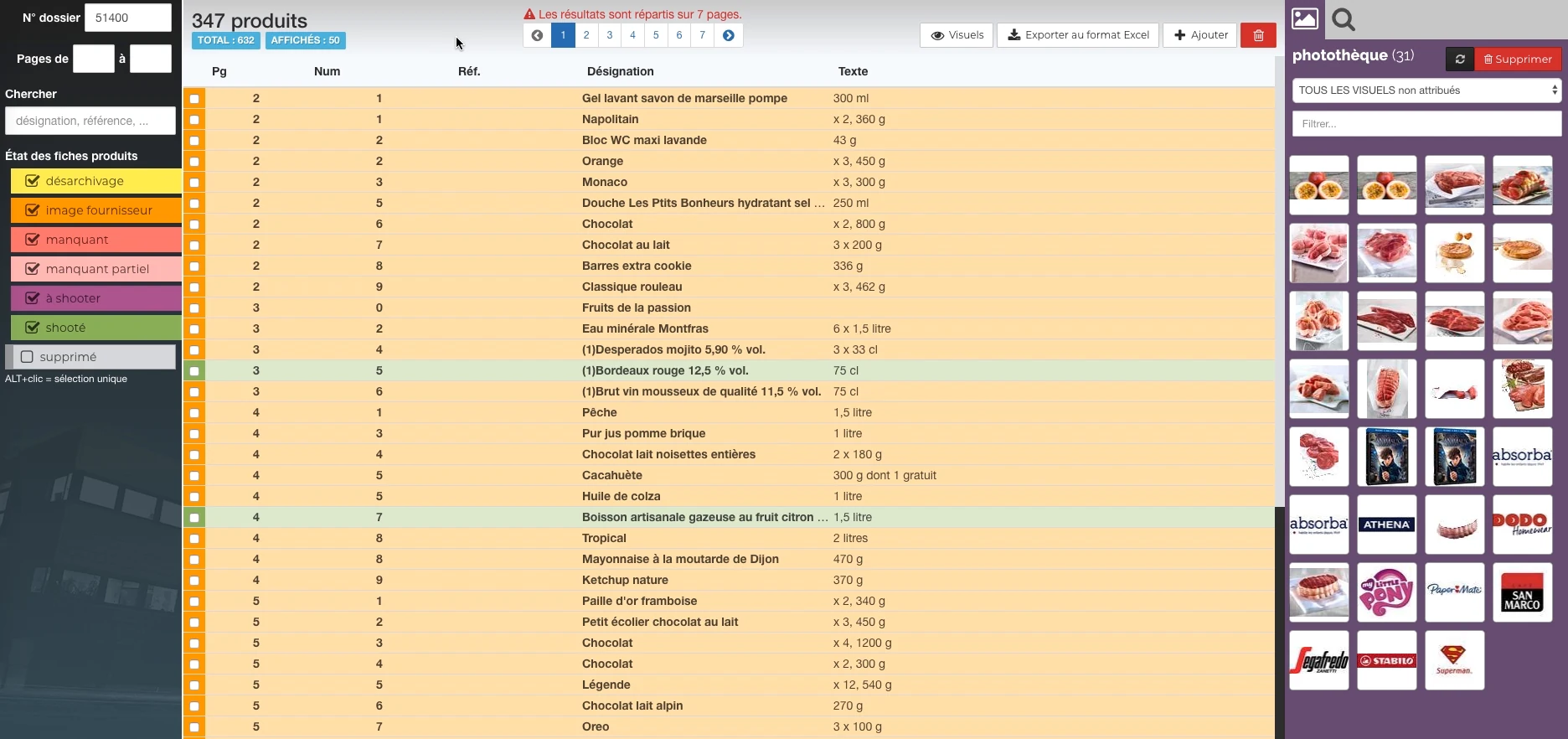
These Rey’actif views situate the functions in the editorial chain: products, images, pages and validation. They come from a demonstration of the platform in 2018.
 Enlarge screen
 Products and their state of preparation
A filterable list per state, folder references and the picture can be accessed in the same view.
Real Rey’actif interface · demo archive from 2018.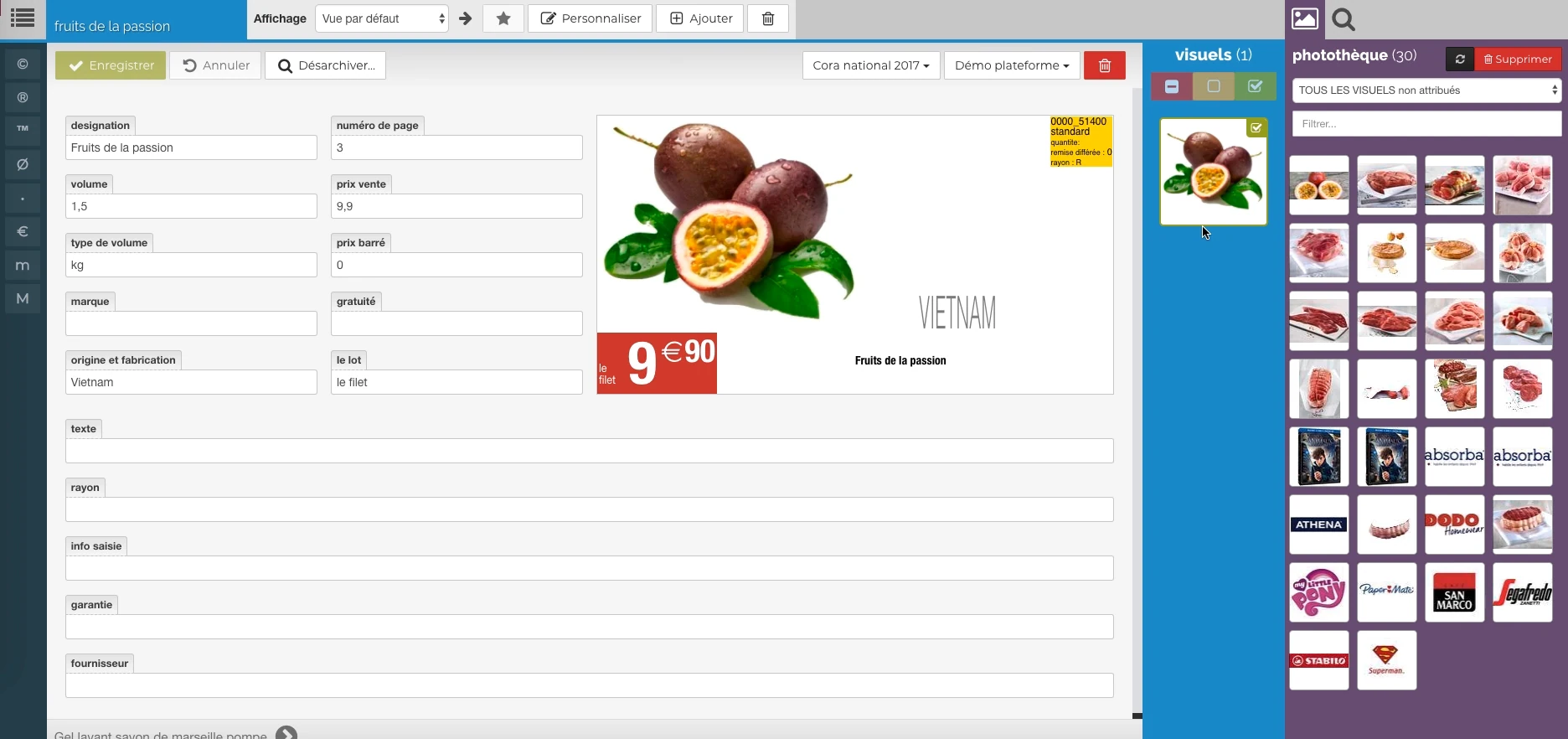 Enlarge screen
 The data meets the visual
Description, price, origin and packaging provide a preview, with image resources alongside.
Real Rey’actif interface · demo archive from 2018.Index content to find it
The Rey’actif ecosystem used Elasticsearch for indexing PIM text and image data. This search layer completed the content storage and had to remain consistent with the repository.
A useful search depends on the information available: references, designations, media links and metadata. The scoping consists of understanding how teams are looking and what allows them to identify the right result.
A duplicate is not always an identical file
The channel may contain a high-definition original, a preview, a cut-out version and a variation intended for the web. Storing them as duplicates without examining their role would cause a loss of production.
Diagnostics included high and low definition relationships, unoriginal previews, and aberrant images. It was necessary to distinguish a technical deviation from an expected variant.
Search similar images
A duplicate image search tool with AI was included in the production environment. It complemented file-based and metadata-based controls.
The result of a detection must be examined in its context: product reference, edition, clipping, dimensions and quality of the original. Visual similarity helps find candidates; Conservation decisions depend on the actual role of resources.
Maintaining links with documents and archives
An image that is moved or misreferenced may remain present on disk and become unobtainable for publication. Recaptures and XML exports also required checking paths and correspondence.
We link the diagnosis of the photo library to its uses: search, consultation, page preparation and export. The quality of the fund is measured by the ability to reuse the right image in the right place.
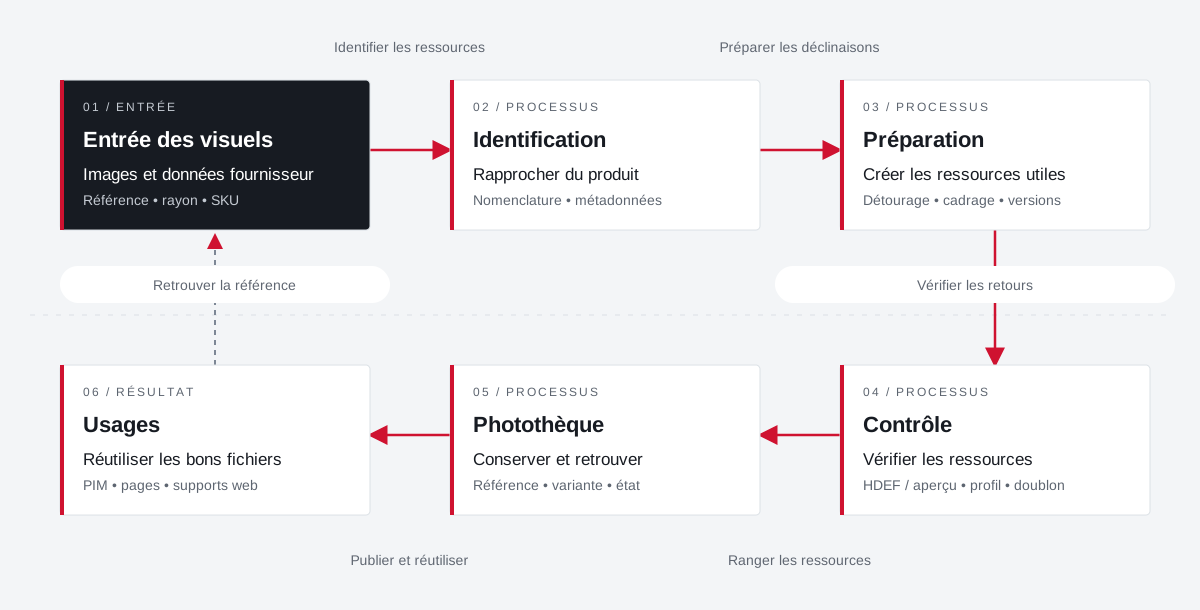
An image returns its product, versions and uses.
The organization of the photo library combines identifiers, metadata, preparation of visuals and reuse in publications.
 Enlarge the diagram
 - 01Identify resources ↓
Entry of visuals
Images and supplier data
Reference • radius • SKU - 02Preparing for Decline ▼
Identification
Bringing the product closer
Nomenclature • metadata - 03Check returns ▼
Preparation
Create useful resources
Clipping • framing • versions - 04Sorting resources ▼
Control
Check resources
HDEF / overview • profile • duplicate - 05Publish and reuse ▼
Photo library
Preserve and find
Reference • variant • condition - 06
Uses
Reuse the right files
PIM • pages • web supports
Enlarge the diagram Closer
Distinguish between the product, the original file and its variations.
Control
Identify duplicates and gaps between previews and high definition.
Reuse
Find the appropriate visual for the document and its destination.
Projects and concrete situations.
Cora: structuring a common photo library
Founder's Experience · Reymann
Define images that can circulate between several agencies and several uses: formats, color profiles, product references, clipping and nomenclature.
Explore the caseReymann : from schedule to studio InDesign files
Founder's Experience · Reymann
Rey-Active Planning brought together assignments, folders and access to studio files. A business application related to production, with weekly view, task statements and commands for recovery and availability of InDesign documents.
Explore the caseFrom offshore clipping to image ready for publication
Founder's Experience · Reymann
Follow an image from his assignment to the claimant to high definition and the insights available on the platform.
Explore the caseYour job deserves
the right tools.
A specific need, a software to evolve, a project to frame.