
Real time & event architectures
The result of an action sometimes arrives well after its request. The Rey’actif ecosystem used WebSocket dispatchers for web applications and InDesign Server processing: an experience in the articulation between events, states and interfaces.
The tools of the
editorial production.
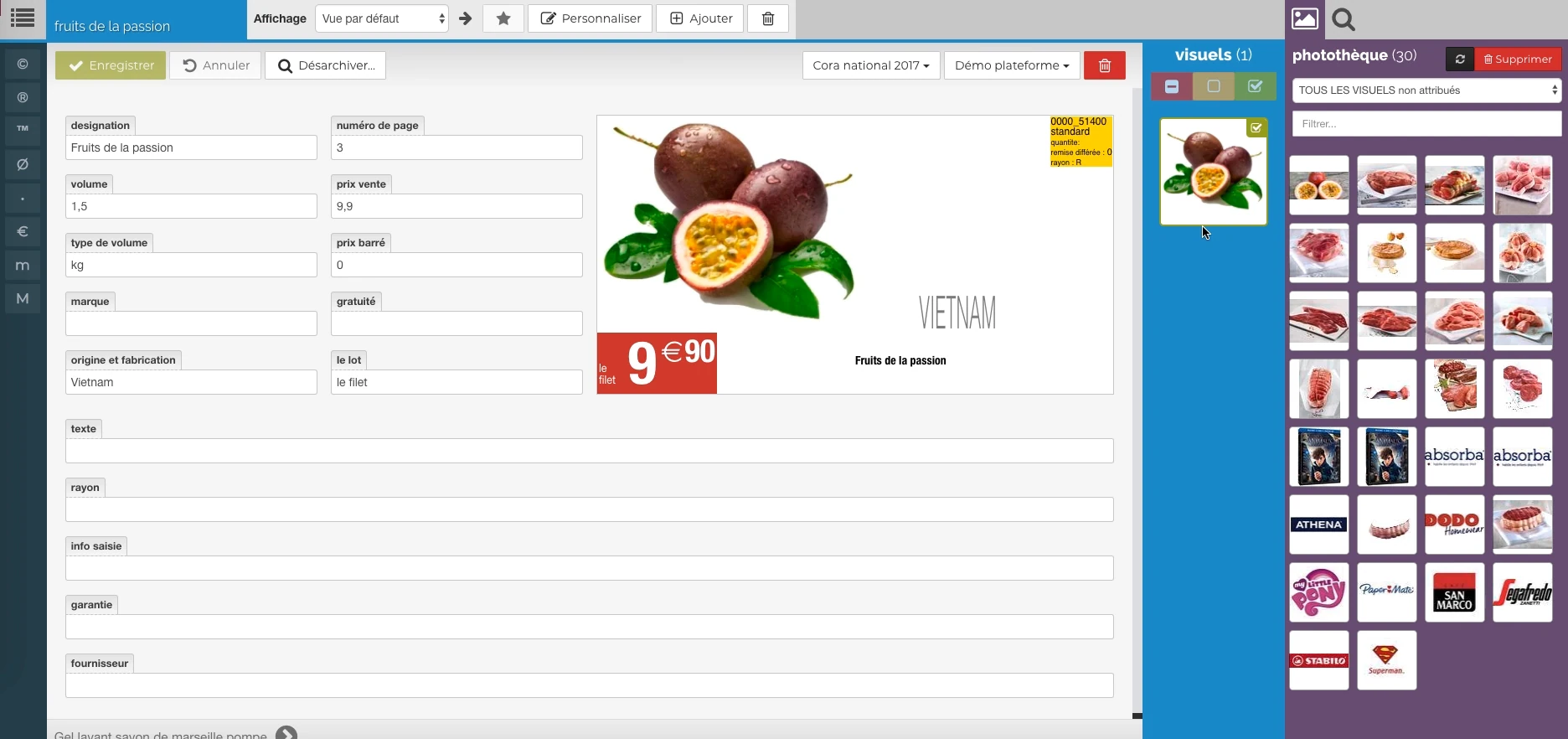
These Rey’actif views situate the functions in the editorial chain: products, images, pages and validation. They come from a demonstration of the platform in 2018.
 Enlarge screen
 The data meets the visual
Description, price, origin and packaging provide a preview, with image resources alongside.
Real Rey’actif interface · demo archive from 2018.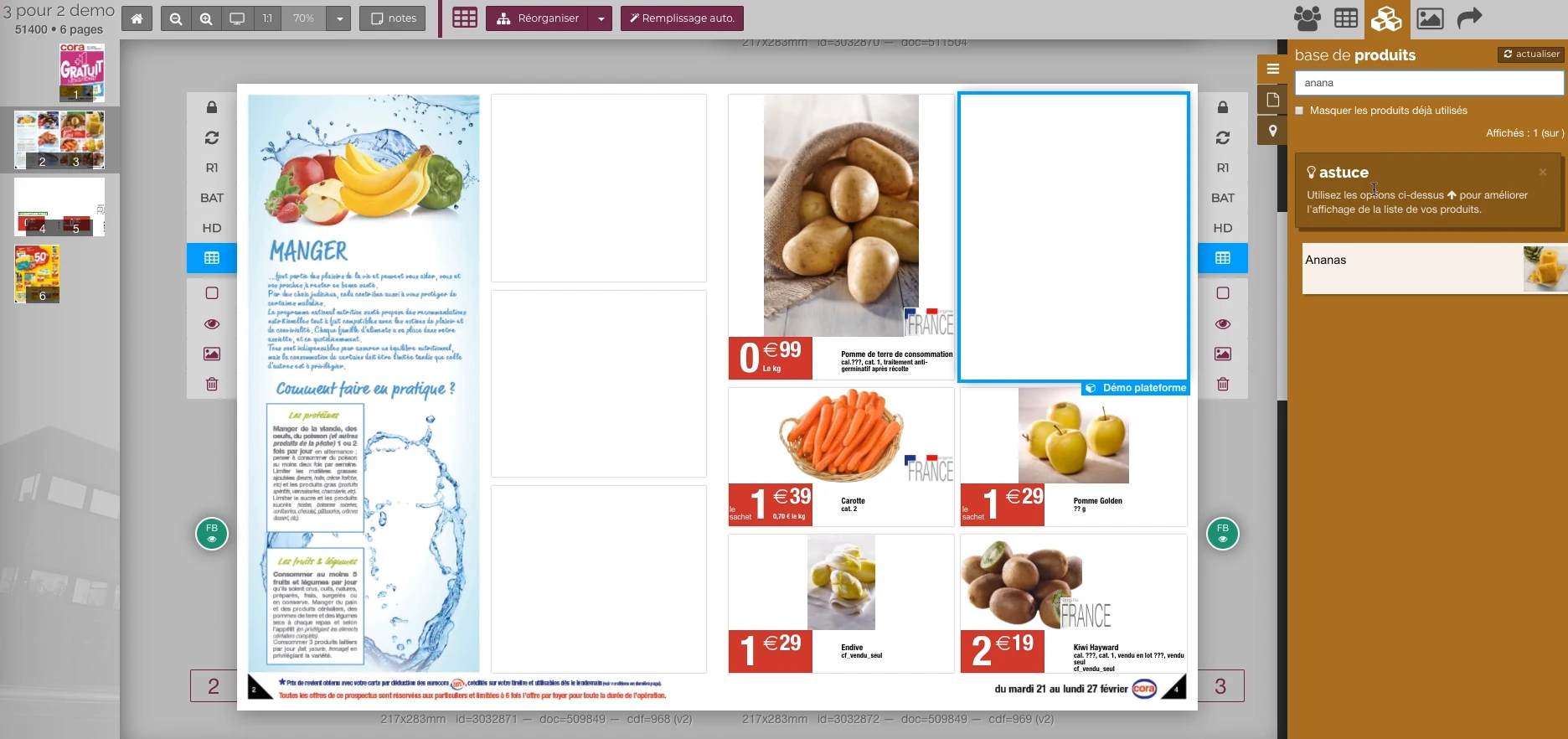 Enlarge screen
 From the product to its location on the page
The double page, the thumbnail and the product base allow you to work in the context of the publication.
Real Rey’actif interface · demo archive from 2018.Separate the request from its result
A document generation or image processing may require a wait. The interface must be able to submit the application and then its evolution, without suggesting that the first acknowledgement of receipt is the final deliverable.
In Rey’actif, processing services and web applications were linked to WebSocket dispatchers. The integration work consisted of linking these components to steps understandable by users.
Connect InDesign Server events
Several processing managers controlled the InDesign Server environments. Checks for INDD changes and PDF status were other follow-up points in the chain.
The feedback must make it possible to distinguish a document to be processed, work in progress and available output. Events serve this common reading between the engine and the interface.
Maintain consistent state after interruption
A user can close his browser, lose a connection or return to a folder later. The design must provide for how to recover the status of the work and bring the information closer to the interface with that of the service.
We examine these scenarios during integration: reconnection, redisplay, processing completed between two views, and message received in an unexpected order. The service must remain intelligible in ordinary work situations.
Respect the user context
A notification must join the right session and the right business context. The Rey-Active environment included management of OAuth sessions and security codes sent by SMS.
The connection between access, events and files requires defining what each user can consult and trigger. The responsiveness of the interface remains linked to access control and data consistency.
Connect applications and keep exchange control.
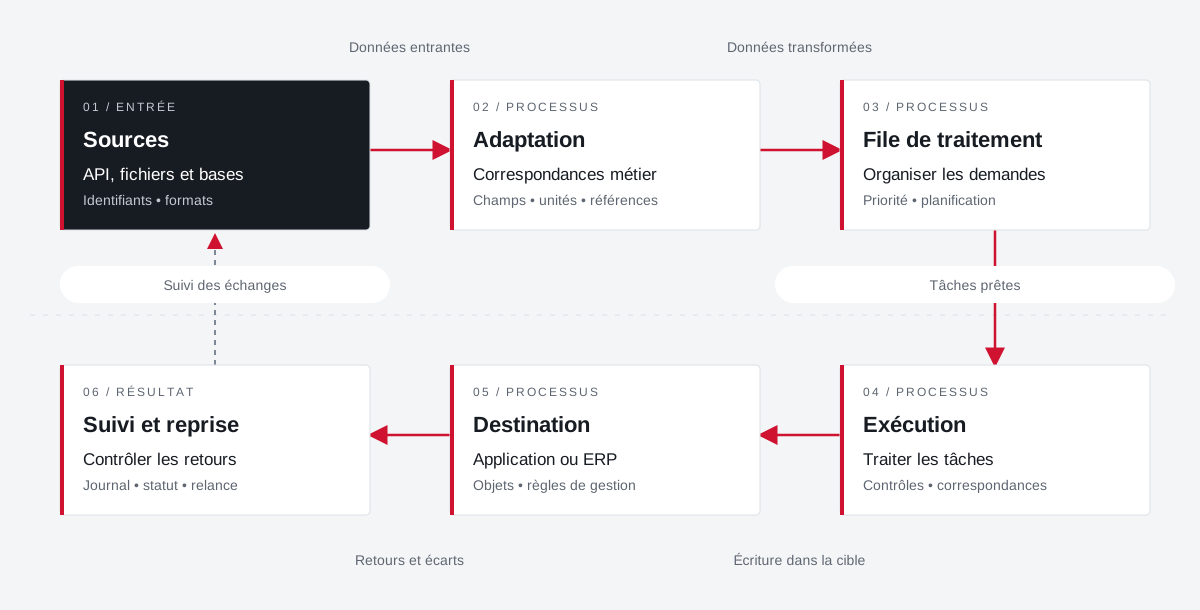
Example of a path with deferred processing: the connector prepares the data, organizes their transfer and keeps the results of the exchanges for monitoring and recovery.
 Enlarge the diagram
 - 01Incoming data ↓
Sources
API, files and databases
Identifiers • formats - 02Transformed data ↓
Adaptation
Business correspondence
Fields • units • references - 03Tasks ready ▼
Processing queue
Organize requests
Priority • planning - 04Writing in the target ▼
Execution
Treating tasks
Controls • matches - 05Returns and variances ▼
Destination
Application or ERP
Objects • management rules - 06
Follow-up and resumption
Control returns
Journal • status • reminder
Enlarge the diagram Identify
Keep the reference of the source and that of the target application.
Transform
Describe correspondences and distinguish direct calls from deferred processing.
Take over
Find the state and context of an exchange to be retired.
Projects and concrete situations.
JPEG & PDF: recover information from the heart of files
Founder's Experience · Reymann
Traces incorporated into JPEGs, Apoove annotations, images and attachments: processing to make information usable between applications.
Explore the caseUTS & InDesign Server: linking typography to generation
Founder's Experience · Reymann
A back-engineering around Universal Type Server to make typographies available in the InDesign Server generation chain.
Explore the caseCirculate products between tools
Project Dtouch
References, categories, rates and images: A useful catalogue also depends on how its data is fed.
Explore the caseYour job deserves
the right tools.
A specific need, a software to evolve, a project to frame.